With axe-core 3.5, you get 4 new rules, several bug fixes, and a new localization. But what has us especially excited is a much faster, more accurate color contrast test.

Faster color contrast testing

Accurately testing color contrast is one of the most challenging pieces of automated accessibility testing. With axe-core 3.5 we have completely changed how we are going about this. The new color contrast functionality speeds implement much faster on large pages with a slight trade-off; small tests may run slightly slower.

The second benefit of the new approach to color contrast is it’s less error-prone than the previous functionality. With this new test method, we are closing 13 color contrast false positives, reinforcing our commitment that in axe-core, false positives are considered bugs. If you report a perceived false positive, we investigate and fix the problem.

New Rules in axe-core 3.5

Rule 1: svg-img-alt

Ensures SVG elements with an img, graphics-document or graphics-symbol role have an accessible text.

Failure Example:

<svg xmlns="http://www.w3.org/2000/svg" role="img">
<circle cx="50" cy="50" r="40" stroke="green" stroke-width="4" fill="yellow"></circle>
</svg>

Passing Example:

<svg xmlns="http://www.w3.org/2000/svg" role="img">
<title>1 circle</title>
<circle cx="50" cy="50" r="40" fill="yellow"></circle>
</svg>

Rule 2: identical-links-same-purpose

Ensures that links with the same accessible name serve a similar purpose.

Needs Review Example:

<a href="https://www.deque.com/">Deque Systems</a>
<a href="https://www.deque.com/">Home</a>

Passing Example:

<a href="https://www.deque.com/">Deque Systems</a>

Rule 3: landmark-no-duplicate-main

Ensures the document has at most one main landmark. This rule is split off from the landmark-one-main rule for better reporting. This rule does not find new issues.

Failure Example:

<main>Main 1</main>
<main>Main 2</main

Passing Example:

<main>Main 1</main>

Rule 4: no-autoplay-audio (experimental)

Ensures <video> or <audio> elements do not autoplay audio for more than three seconds without a control mechanism to stop or mute the audio. This rule is experimental and is currently available in our early-adopters extension axe coconut. To run experimental rules using the axe-core API, use the “experimental” tag in the runOnly option.

Failure Example:

<audio src=”path/to/audio/duration20s.mp3” autoplay></audio>

Passing Example:

<video src=”path/to/video/duration20s.mp4" autoplay controls></video>

Deprecated Template Language

The templating language used for messages in translations and custom rules is now deprecated. The new templating format allows axe-core to run under a stricter content security policy. The current format remains available in axe-core until the next major release of axe-core. We strongly recommend upgrading to the new template language within the next six months to anyone using custom rules and for authors of axe-core translations. For more information, see the message template documentation.

Deprecated Rules

The aria-dpub-role-fallback and layout-table rules are deprecated and superseded by rules added to axe-core in previous releases. These rules are now turned off by default but remain available until the next major release of axe-core.

Other Changes

  • New Danish localization, special thanks to Daniel Freiling and Marianne Gulstad Pedersen for contributing this new translation.
  • Performance improvement to td-has-headers.
  • The region and landmark-* rules now return individual elements instead of reporting the entire page as one issue.
  • The meta-viewport rule is now a best-practice instead of a WCAG 2.0 failure.
  • Improved the issue text of several rules involving the role attribute

For a complete list of changes, see the axe-core changelog.

Available in Deque Products

The axe-core 3.5 release will be available soon for WorldSpace Attest, Assure, Comply, and axe Pro.

Wilco Fiers

Wilco Fiers

Wilco is the principal product owner of axe-core and axe DevTools at Deque Systems. He is based in the Netherlands and has worked in accessibility for over 18 years. During this time, Wilco has worked in auditing, consulting, standards authoring, and accessibility tool development. Notable work includes being project manager of WCAG 3, founding chair of ACT Rules Community, lead developer of axe Linter and WCAG-EM report tool, and industry advisor to the EU's Web Accessibility Directive Expert Group.

Tags:  axe-core news

We are very excited to announce the immediate availability of the 4.3 release of the axe Chrome Extension! Included in this release are bug fixes, usability improvements, and a new Intelligent Guided Test for axe Pro users.

Introducing the Keyboard Guided Test

The Keyboard Guided Test is the first new test to be added since axe Pro was made available last year. This test is designed to help raise issues around missing focus indicators, missing ARIA roles, keyboard inaccessibility, and many others.

All of this is accomplished by the axe extension automatically tabbing through all of the stops on the page and collecting information about each one. Once this is completed, the user is asked a series of simple questions like many of the other guided tests, and Voilà! A succinct list of accessibility issues with the tab stops on the tested page.

Screenshot of focus indicators highlighted via the keyboard tool

Figure: Notice the focus indicators numbered 1 through 13 that were automatically added while going through the keyboard intelligent guided test

Usability & Improvements

As part of this release, the URL of the page being analyzed is listed in the “What you’re analyzing” section. In addition, we have renamed the Scoping functionality to use the word “Component” to more succinctly reflect the usage trends in modern day web development. With this capability, users can analyze individual parts of a page (modals, forms, etc.) so they can focus on particular areas of interest without being bogged down by excess test results.

Upcoming Releases

The team behind axe Pro is hard at work on a number of improvements and can’t wait to share the fruits of their labor. Stay tuned to this blog and our Twitter feed in the coming months for a number of enhancements and improvements coming to your favorite accessibility extension as well as information about general availability.

Upgrade to axe Pro for free and try our 7 guided tests, manage multiple tests, export results, and more…

Deque Systems

Deque Systems

Deque is the global leader in digital accessibility, helping the world’s top enterprises build inclusive products, services, and experiences and achieve lasting compliance. Recognized by leading industry analysts for its AI-powered tools, comprehensive services, and developer-trusted solutions, Deque delivers the industry’s most complete accessibility offering. The Axe platform, anchored by Axe-core, has more than 3 billion downloads and 875,000 installed extensions, making it the global standard for accessibility testing. As a pioneer of people-first accessibility, Deque applies a human-in-the-loop approach that blends expert insight with AI innovation to advance its mission of digital equality for all.

With Market Gaps, Brand Reputation and Legal Threats Looming, Companies Must Take a More Decisive Approach

HERNDON, VA – January 23, 2019 – Deque Systems, a leading software company specializing in digital accessibility, today announced the results of a survey showing that most financial services firms are not adequately ensuring that their websites, mobile sites and apps are accessible to people with disabilities.

The survey of financial services organizations, conducted by QA Vector® Research, suggests that these firms are not adequately prioritizing and implementing accessibility, which increases their legal risks while also hurting their ability to compete in a digital world.

“Across industries, digital accessibility is shifting from a choice to a business imperative, and this is especially true in the financial services industry, given the high level of connectivity consumers demand to their personal finances,” says Preety Kumar, CEO, Deque Systems.  “A lack of accessibility in financial services can be particularly damaging and costly from multiple perspectives including competitive market share, brand goodwill and legal risk.”

The survey found the following:

  • Only 35 percent of software leaders across various types of financial services firms (banks, insurers, asset managers and fintechs) say accessibility is among their top strategic concerns. Firms are either buying into the need for accessibility, or deprioritizing it.
  • Only 25 percent are embedding accessibility testing into software development processes. Attention to accessibility is often event-driven (sales, litigation, employee), but many firms struggle with knowing where to begin.
  • More than 70 percent of financial services firms indicate no clear ownership of digital accessibility within corporate governance. Broad familiarity with inclusivity is high, but accessibility is often orphaned or
  • Fewer than 30 percent of financial services firms have reliable or meaningful key performance indicators (KPIs) for accessibility. Though mature firms are moving accessibility from an intermittent “diet” to a fuller “lifestyle” change with effective supporting tracking measures.

Failure to pay attention to accessibility can have several negative ramifications. First, there’s the sheer market size to consider –approximately one in five people in the United States, or 64 million, have some form of disability.

There is also potential brand damage to consider, with consumers’ decisions on with whom they choose to conduct business increasingly influenced by social justice causes. Inaccessible digital properties may translate to legal risks, with ADA data showing that accessibility-related lawsuits exploded by 181 percent from 2017 to 2018.

“Most financial services firms would never think to take away accommodations for persons with disabilities in their physical operations. But that’s exactly what they’re doing when their digital properties aren’t accessible; it’s the equivalent of hanging a sign outside your door saying ‘closed for business’ to millions of people,” continues Kumar. “Many firms erroneously believe achieving digital accessibility is too costly and time-consuming, when in fact, it is much less expensive and laborious to embed inclusivity at the outset of the development effort.”

“While compliance may be an underlying reason for starting an accessibility journey, that likely won’t internally motivate someone and may not lead to lasting change,” says Bryan Osterkamp, Technical Architect Principal at USAA. “You want to change the culture of the organization and how they think of accessibility. Giving examples of how a blind user is now able to use your mobile app – and not an inaccessible competitor’s app – is a good example.”

For a complete copy of the report visit: https://accessibility.deque.com/qa-research-finance

About This Survey

This survey was conducted by the QA Vector® Research arm of QA Financial, an independent information, resource and events company focused on helping financial services firms improve software quality. Analysts for QA Vector® spoke to 26 software leaders during August and September 2019 at banks, insurers, fintech firms and asset managers in the USA, UK, Netherlands, Singapore and India. Based on these conversations QA Financial identified key insights that will enable software leaders at financial firms to prioritize and pursue pragmatic software delivery process reinvention.

ABOUT DEQUE:

Deque (pronounced dee-cue) is a web accessibility software and services company, and our mission is Digital Equality.  We believe everyone, regardless of their ability, should have equal access to the information, services, applications, and everything else on the web.

We work with enterprise-level businesses and organizations to ensure that their sites and mobile apps are accessible. Installed in over 250,000 browsers and with over 1,000 audit projects completed, Deque is the industry standard.

News Media Contacts

At Deque:
Ryan Bateman, 703-225-0380, marketing@deque.com
Kristina LeBlanc, 508-930-5636, kristinawleblanc@gmail.com
Frank Cioffi, 415-893-1570, frankc@medialinkgroup.com

Deque Systems

Deque Systems

Deque is the global leader in digital accessibility, helping the world’s top enterprises build inclusive products, services, and experiences and achieve lasting compliance. Recognized by leading industry analysts for its AI-powered tools, comprehensive services, and developer-trusted solutions, Deque delivers the industry’s most complete accessibility offering. The Axe platform, anchored by Axe-core, has more than 3 billion downloads and 875,000 installed extensions, making it the global standard for accessibility testing. As a pioneer of people-first accessibility, Deque applies a human-in-the-loop approach that blends expert insight with AI innovation to advance its mission of digital equality for all.

Tags:  finance news QA Testing

In the past year, the European Union has made great strides in passing legislation that improves accessibility for people with disabilities in the EU (approximately 80 million people). The European Accessibility Act (EAA) and the European Web Accessibility Directive are two pieces of legislation that will have an immediate and ongoing impact in the next few years.

Below, this post will review each piece of legislation, discuss who it applies to and major deadlines, and explain the differences and similarities between the European Accessibility Act and the European Web Accessibility Directive.

European Accessibility Act (EAA)

On June 7th, 2019 the European Union formally adopted the European Accessibility Act. The main goal of the European Accessibility Act is to create a common set of accessibility guidelines for EU member states and fix the diverging accessibility requirements.

While many EU Member States already have some form of accessibility legislation, there is no EU law on accessibility. The EU member states have two years to translate the act into their national laws and four years to apply them.

The European Accessibility Act (EAA) also applies to any business’s product or service that is sold or in use within the Eurozone, not just EU member state businesses.

Despite the enforcement date being six years away, we strongly encourage organizations to get ahead of the curve and start implementing accessibility into their product and service design stages now.

The EAA aims to improve the functioning of the internal market for accessible products and services. This act covers products and services that are the most important for people with disabilities and the increasing aging population, such as:

  • Computers and operating systems
  • ATMs, ticketing and check-in machines
  • Smartphones
  • TV equipment related to digital television services
  • Telephone services and related equipment
  • Access to audio-visual media services such as television broadcast and related consumer equipment
  • Services related to air, bus, rail, and waterborne passenger transport
  • Banking services
  • E-books
  • Online shopping websites and mobile applications

The accessibility requirements apply unless the requirements would change the very nature of the product/service or if the requirements would impose an undue financial burden. The undue burden exemption would largely apply to micro-organizations with less than 20 employees.

EU Web Accessibility Directive

Who must conform to the EU Web Accessibility Directive?

On October 26, 2016, the EU Parliament and the Council of the European Union passed the EU Web Accessibility Directive. The Directive aims to create a more standardized and harmonized framework around the accessibility of websites and mobile applications of public sector bodies. Specifically, this directive applies to:

  • State, regional or local authorities
  • Bodies governed by public law
  • Associations formed by one (or more) such authorities or one (or more) such bodies governed by public law if those associations are established for the specific purpose of meeting needs in the general interest, not having an industrial or commercial character

It is important to note that although the EU Web Accessibility Directive applies to public-sector websites and apps, it will have an impact on private organizations as well. Organizations that regularly do business with or provide products/services that impact public-facing government sites and apps may need to comply.

There are exceptions to the coverage; public service broadcasters or non-governmental organizations that do not provide services that are important to the public or specifically for people with disabilities are excluded from this Directive.

Upcoming Deadlines

On December 23, 2018 member states were required to have the following:

  • An accessibility statement
  • An accessible feedback mechanism
  • An enforcement procedure outlining penalties and process for non-compliance
  • Standards for monitoring methodology and reporting
  • Uniform technical specifications for mobile apps

Below are the following upcoming deadlines that member states are required to adhere to:

2019 Deadline 2020 Deadline 2021 Deadline
On September 23, 2019, all new public sector websites and apps were required to conform to the directive By September 23, 2020, all new and existing public website must conform to the directive By June 23, 2021, all new and existing mobile apps must conform to the directive

Harmonized Accessibility Standards

EN 301 549

The Directive itself references the four principles of accessibility and sets the minimum standard for accessibility equivalent to WCAG 2.1 AA. The method of enforcement for this directive is called EN 301 459.

EN 301 549 is an accessibility standard that covers all Information and Communication Technology (ICT). This includes almost every digital product you can think of: cell phones, printers, ATMs, electronic documents, software, web content and more.

EN 301 549 points to the Web Content Accessibility Guidelines (WCAG) version 2.1 AA as a minimum level of compliance.

WAI-Tools and ACT Rules

The EU Directive notes the shortcomings of EN 301 549, especially for mobile applications. To address these shortcomings, the European Commission Rolling Plan on ICT Standardization calls for updating EN 301 549 as well as developing a methodology/framework for testing requirements.

The Web Accessibility Initiative (WAI)-Tools of the W3C, is an international effort currently being developed to fill the need for a standardized methodology for testing. The backbone of the WAI-Tools project is a common set of open test rules that provide an authoritative interpretation of the Web Content Accessibility Guidelines (WCAG) developed by the W3C.

WAI-Tools will accelerate the development of the W3C repository of authoritative test rules, to better address the urgent demand created by the EU Directive on web accessibility.

 Deque is proud to be partnering with the W3C in WAI-Tools and is currently helping to develop and write ACT rules. 

Ongoing Requirements for Member State Compliance

  1. An Accessibility Statement – outlining and explaining inaccessible elements and guidelines for users may provide feedback
  2. Monitoring – periodic monitoring and sampling of web pages, arrangements of automatic, manual and usability test.
  3. Reporting – starting 23rd of December 2021, and every three years thereafter Member State must report on their compliance in an accessible report format that will be published to the public.

Similarities and Differences Between the EAA and the Web Accessibility Directive

While both pieces of legislation make great strides for accessibility in the EU, there are many similarities and differences which are important to note. Similarities between the two pieces of legislation include:

  • The law’s compliance will be monitored by market surveillance authorities
  • There are opportunities for the consumer to appeal against lack of accessibility
  • Member States may demand fines for those who do not comply with the law
  • Member States should report the status to the Commission
  • Both pieces of legislation were created in an attempt to harmonize accessibility standards across the Member States
  • Difference between the two pieces of legislation include:

The EAA applies to hardware, software, web (only for e-commerce, transportation, and banking verticals), and mobile (only for e-commerce, transportation, and banking verticals) and the Web Accessibility Directive applies to web and mobile accessibility for government agencies.

  • The EAA applies to both public and private businesses, while the Web Accessibility Directive applies to government-funded agencies and their third-party vendors.
  • The Web Accessibility Directive is actively being enforced, while the EAA won’t be enforced until 2025.
  • Both pieces of legislation point to WCAG for web accessibility requirements, although the Web Accessibility Directive references WCAG 2.1 directly.

Immediate Steps Your Organization Can Take to Prevent an Accessibility Lawsuit or Complaint

  1. Provide an accessibility statement on your website – The best method to prevent legal action against being inaccessible is having an accessibility statement that outlines your organization’s ongoing commitment to accessibility.
  2. Audit your website – Most accessibility projects begin and end with an audit. They assess the current state of your site or application’s accessibility.
  3. Start simple with free, open-source automated testing tools, such as axe. Such tools can catch between 30-50% of accessibility issues. Axe is also available as a browser extension for Chrome and Firefox, and there are axe tools for testing Android applications and iOS (coming soon).
Deque Systems

Deque Systems

Deque is the global leader in digital accessibility, helping the world’s top enterprises build inclusive products, services, and experiences and achieve lasting compliance. Recognized by leading industry analysts for its AI-powered tools, comprehensive services, and developer-trusted solutions, Deque delivers the industry’s most complete accessibility offering. The Axe platform, anchored by Axe-core, has more than 3 billion downloads and 875,000 installed extensions, making it the global standard for accessibility testing. As a pioneer of people-first accessibility, Deque applies a human-in-the-loop approach that blends expert insight with AI innovation to advance its mission of digital equality for all.

JavaScript frameworks are becoming the norm for creating powerful, fast, and adaptive web sites. One of the most popular frameworks is React. React has risen in popularity over the last few years at an unbelievable rate. With the ability to create reusable components, a virtual DOM, and a massive support community behind it, React has advantages that are seemingly limitless.

However, React has also developed a stigma within the accessibility community that web applications created in React are not accessible. Lots of accessibility advocates, and even developers who develop in the framework, think that accessibility is a very big challenge that can be almost impossible to achieve. Some of these issues include:

  • One generic page title that cannot change
  • Focus management makes applications impossible to navigate with the keyboard
  • Extra added <div> and wrappers can break semantics
  • Using semantic HTML is hard to achieve

The list goes on and on, and although all of these are very valid concerns from an accessibility perspective, these are all challenges that can be overcome within the framework itself.

The best way to remedy all of the above stigmas and concerns is to create an awareness that React does, in fact, have a lot of accessibility that is built into the framework, and that it also has a large community of accessible add-ons that can help you achieve accessible components. Here are some tips and tricks that can help you achieve the most accessible React application possible!

Use Semantic HTML

This one may be pretty obvious, however, there is still React content that does not use semantic HTML to create basic elements on the page. Instead of creating a button with <div> and <span>, use the <button> tags that have inherent meaning for assistive technology. The more semantics you can use in your application, the easier it will be on you (the developer) and the assistive technology user.

Take Advantage Component Life Cycles

The component life cycle in React allows you to tap into multiple functions during mounting and updating that can help with accessibility. For example, when a specific component is mounted on your page and you need focus to go to that new component, you can use componentDidMount() function and write JavaScript to put the focus on it. You can also use the componentDidUpdate() function to toggle ARIA states within your component. Using the lifecycle can help with these and many other scenarios to make your content more accessible.

Example use case of using lifecycle to set focus on load:

componentDidMount() {

this.alertText.focus();

}

Use Fragments Where Appropriate

One often-forgotten feature in React is having to add in an extra container to surround your content. This may seem like just a best practice, however, this can cause semantic accessibility issues if you have multiple elements in the same render() function or you are injecting component into another semantic HTML tag. The best way to make sure that the markup you have is rendered properly in the DOM is to use React Fragments. Fragments let you group HTML elements together without adding any extra nodes to the DOM.

Example use case where data is being injected into a table, and fragment must be used to not break table semantics:

<Fragment>

<td>{this.props.userName}</td>

<td>{this.props.title}</td>

</Fragment>

Check Your Add-Ons for Accessibility

Node and yarn packages can make life so much easier as a developer. However, a lot of the packages that are in use are inaccessible. If you choose to use the package, and it has HTML markup that is inaccessible, you are responsible for that content! It’s easy enough to check packages for accessibility, and if need be, make changes in it to make it accessible or simply find another package that is accessible.

Take Advantage of Title Package and Services

Be sure that whenever your view changes (i.e. moves to a new page) that the title is changing as well. Although this is seen as difficult, React makes it easy by having multiple different packages (such as React Document Title) that let you dynamically set the title when the view changes.

Example use of Document title service in a page component:

<DocumentTitle title="React Accessibility Example" />

You can also change the title in the life cycle of the component using didComponentMount() and calling document.title=”your title”.

Use Automation to Test Your Components

This is the big one. When possible, use automation in your component unit test cases to check for accessibility issues. Using a tool such as axe-core to integrate into your unit test cases can help catch up to 50% of accessibility violations. The more you test, the more likely the content you have will be accessible!

In Summary

React can be an accessible application framework with the right knowledge and the right know-how. The stigma that it is not an accessible framework is simply not true. It has some of the best built-in accessibility functionality there is out there, and a large community of accessibility advocates that are creating content that is easily consumable in your application.

If we continue to spread knowledge and awareness of the issues that come with JavaScript frameworks like React, and also teach and guide others on how to remediate these issues, there is no limit as to how accessible this framework can be!

Update: I’m hosting a webinar on Accessibility and React on February 4th. Register for the webinar here.

Mark Steadman

Mark Steadman

Mark is an accessibility developer services consultant at Deque. Mark has been working in the accessibility field for 4 years now. He is extremely passionate about the work that he does and strives to make all content on the web/mobile accessible for all. Mark's main focus is researching single-page applications (EmberJS, ReactJS), how accessibility affects them, and how to remedy the issues that are in the frameworks.

Sometimes, the visible anchor text as mandated by the user interface design is not very meaningful to vision impaired users. One could use aria-label or the title attribute or even off-screen text on text links. But what’s the best practice based on current assistive technology support?

Comparing Screen Reader Behavior for Aria-label and Title on Text Links

Links used for this test

  1. Different title and anchor text: Annual Report 2013   Markup: <a href=”#” title=”Download PDF”>Annual Report 2013</a>
  2. Identical title and anchor text: Annual Report 2013   Markup: <a href=”#” title=”Annual Report 2013″>Annual Report 2013</a>
  3. Aria-label present besides anchor text: Annual Report 2013   Markup: <a href=”#” aria-label=”Download PDF”>Annual Report 2013</a>
  4. Both Aria-label and title present besides anchor text: Annual Report 2013   Markup: <a href=”#” aria-label=”Download PDF” title=”2013- Annual Report”>Annual Report 2013</a>

The Comparison

Screen Reader Output
Link JAWS 15 NVDA 2013.3 VO on OSX Lion VO on iOS (iPad)
A. Different title and anchor text: Anchor text + title Anchor text + title Anchor text Anchor text + title
B. Identical title and anchor text: Only anchor text Anchor text + title Anchor text Anchor text + title
C. Aria- label present besides anchor text: Aria-label Anchor text Anchor text + aria-label Aria-label
D. Both Aria-label and title present besides anchor text: Aria-label + title Anchor text + title Anchor text + aria-label Aria-label + title

Notes:

  • For JAWS, the above behavior is the same in Firefox and Internet Explorer (Windows 7).
  • NVDA was tested only with Firefox
  • VoiceOver was used with Safari on OSX and iOS
  • Default verbosity settings were used for all screen readers. The test links are not indicative of markup to be used for download links for PDF (or other) file types.

Conclusion:

  • JAWS 15 provides the best user experience followed by VoiceOver on iOS
  • The title attribute is read by VoiceOver on OSX when the user explicitly checks for presence of help text on the element (VO+Shift+h). This is akin to interrogating a link for presence of a title attribute with JAWS (or Window-Eyes)
  • NVDA developers are working on providing a better experience when a link contains aria-label as per the thread Regarding the accessible name calculation for aria-label within links?, which in part, motivated this article.

Both aria-label and the title are listed in the text alternative computation algorithm with the title having the lowest preference. The aria-label gains preference even over the anchor text in determining the accessible name for a link. In situations where text that is different from the anchor text needs to be rendered to aid vision impaired users, the aria-label is the better choice. When the link’s name (i.e. anchor text or aria-label) needs to be supplemented with advisory text, the title is more suitable. This will reduce the dependence on the CSS off-screen text method for providing such supplemental text to aid non-sighted users. It may be noted that neither aria-label or title is available to keyboard-only users; but the title is exposed as a tooltip when one mouses over the element.

Update:

Results with NVDA 2014 are better now. So the outcome in situations B, C and D above are different:

  • NVDA ignores title if it is identical to anchor text
  • NVDA reads aria-label and ignores anchor text

Update 2020:

Since the last update to the article in December 2015, there have been some changes to browser acceptance and usage by screen reader users:

  • Chrome is used more extensively now in addition to Firefox
  • Support for Microsoft Edge has improved significantly leading to an uptick in usage
  • Mobile platform: Chrome with TalkBack on an Android device is the next preferred alternative after VoiceOver and Safari on an iOS device

Reference: WebAIM: Screen Reader User Survey #8(2019)

Therefore as the new year rolled in, the following screen readers and browsers were re-tested for this update. The examples used here are the same as thos used in the original write-up over five years ago.

Browsers on Windows 10 laptop

  • Chrome 79 and Chrome 78
  • Firefox 71 and Firefox 68.3.0 ESR
  • Internet Explorer 11
  • Microsoft Edge

Mobile Testing:

  • VoiceOver and Safari on an iPhone 11 with iOS 13.3
  • TalkBack 8.1 with Chrome on a Pixel with Android 10

Results

Screen readers consistently and correctly expose aria-label overriding the anchor text on the Windows 10 platform as well as on mobile devices- iOS and Android. This demonstrates good support for the WCAG technique, ARIA8 – Using aria-label for link purpose, which depends on the aria-label text overriding the anchor text.

Results with JAWS 2020 / JAWS 2019

  • JAWS behaves identically across Chrome, Firefox and Internet Explorer with the identical title in Case B being ignored.
  • The only failure noted is with Microsoft Edge: JAWS simply fails to read the title attribute for all the four links.

Results with NVDA

  • With Internet Explorer, NVDA does not expose the title attribute for any of the links.
  • NVDA reads the identical title text (Case B) when using Chrome or Edge. The user experience with Firefox is better as previously updated in 2015

Results on Mobile Devices

  • No change in VoiceOver behavior.
  • TalkBack repeats the identical title text with Chrome on the Pixel with Android 10

All in all, the only aberrations that need to be resolved are for exposing the title attribute when using Edge and IE 11 with JAWS and NVDA respectively. That a change for the better will happen for IE 11 and NVDA combination is quite unlikely.

Sailesh Panchang

Sailesh Panchang

One of Deque’s first employees, Sailesh is experienced in conducting accessibility assessments of Web content and software using combination of automated and manual-testing techniques including code reviews. In addition, he works to enable Deque clients to get started and become effective users of Deque’s tools. Sailesh is very strong in application of accessibility techniques for HTML and WAI-ARIA for complying with Section 508, WCAG and legislation like Air Carrier Access Act (ACAA). Sailesh is an assistive technology user and relies on screen reading software like JAWS, NVDA, VoiceOver and TalkBack.

A new privacy law called the California Consumer Privacy Act (CCPA) goes into effect on January 1, 2020. The privacy rights established by the CCPA are for all residents of California, including people with disabilities. CCPA applies to any US business that has consumers living in California and meets one or more of the following thresholds:

  • Gross annual revenue of $25 million or more;
  • Buys, receives, sells or shares personal information for commercial purposes of 50,000 or more consumers, households, or devices;
  • Make 50% of more of annual revenues by selling consumers’ personal information.

It is best practice for any business outside of California to comply with CCPA (if the requirements above apply), because at some point in time they may have an eCommerce transaction with a California resident.

US businesses that meet the CCPA threshold are required to:

  • Provide notice to consumers at or before collecting their personal data.
  • These notices must be accessible to people with disabilities.
  • Create a way for consumers to know, opt-out and delete their personal data.
  • The ability to know, opt-out and delete personal data must be accessible to people with disabilities.

Any business, service provider or other persons that fail to comply with CCPA within 30 days after being notified of alleged noncompliance, they are at risk for a potential lawsuit and the following fines:

  • A civil penalty of not more than two thousand five hundred dollars ($2,500) for each violation or seven thousand five hundred dollars ($7,500) for each intentional violation, which shall be assessed and recovered in a civil action brought in the name of the people of the State of California by the Attorney General. The civil penalties provided for in this section shall be exclusively assessed and recovered in a civil action brought in the name of the people of the State of California by the Attorney General.

The State of California Department of Justice has published a CCPA Fact Sheet that can help you determine if this law applies to your business.

CCPA Individual Consumer Rights

If you are a consumer in the state of California, under CCPA you have the right to:

  • know exactly what personal information of yours has been collected by a qualified business, used, shared or sold;
  • delete your personal information held by a qualified business;
  • opt-out of the sale of your personal information by a qualified business;
  • non-discrimination in terms of the price or service when you exercise your privacy rights under CCPA.

All consumers in California have these rights, including people with disabilities.  So, the CCPA required processes for knowing, deleting and opting out of the sale of personal information must meet digital accessibility standards.

The CCPA does not specify that businesses should conform to which technical requirements businesses should comply with. However, the Web Content Accessibility Guidelines (WCAG) are the most widely accepted accessibility standards both globally and in the United States.

Accessibility Take-Aways

It’s common for sites to use toast messages or form elements to inform users of personal data collection. It’s also a common practice to offer a form to users to submit a request, opt-out, or deletion of their data. Have you built those elements with accessibility in mind? Whether you’ve built those services in-house, or if you’re relying on a 3rd party service, it’s still your responsibility.

Deque is ready to help your company navigate the accessibility requirements of the CCPA. We are experts in making sure people with disabilities have equal access to information and functionality. Let us help you build an accessible and sustainable solution.

Glenda Sims

Glenda Sims

Glenda Sims is the Chief Information Accessibility Officer at Deque, where she shares her expertise and passion for the open web with government organizations, educational institutions, and companies ranging in size from small businesses to large enterprise organizations. Glenda is an advisor and co-founder of AIR-University (Accessibility Internet Rally) and AccessU. She serves as an accessibility consultant, judge, and trainer for Knowbility, an organization whose mission is to support the independence of people with disabilities by promoting the availability of barrier-free IT. In 2010 Glenda co-authored the book InterACT with Web Standards: A holistic approach to Web Design.

What is AODA?

The Accessibility for Ontarians with Disabilities Act (AODA) is a law that was established in 2005 by the government of Ontario, Canada to develop and enforce accessibility standards for government, businesses, nonprofits, and public sector organizations.

The goal of AODA is for the province of Ontario to be accessible to people with disabilities by 2025.

Important Upcoming Deadline: All public sector organizations (including government, municipalities, and educational institutions) and all private organizations with 50 or more employees (including businesses, nonprofits, and private educational institutions) are required to be WCAG 2.0 AA accessible (excluding live captioning and audio descriptions) by January 1st, 2021.

For a full list of important filing and accessibility deadlines, please see below. Please note certain types of organizations may have varying filing deadlines depending on their size and whether they are in the public or private sector.

Organization Type December 31st, 2019 January 1, 2020 December 31st, 2020 January 1, 2021 December 31, 2021 December 31, 2023 December 31, 2025
Businesses and Nonprofits (20-49 employees) N/A N/A Must File Compliance Report N/A N/A Must File Compliance Report N/A
Businesses and Nonprofits (50+ employees) N/A N/A Must File Compliance Report Make all websites and web content accessible N/A Must File Compliance Report N/A
Private Sector Publishers (1-19 employees) N/A Provide other printed learning materials in an accessible format N/A N/A N/A N/A N/A
Private Sector Publishers (20-49 employees) N/A Provide other printed learning materials in an accessible format Must File Compliance Report N/A N/A Must File Compliance Report N/A
Private Sector Publishers (50+ employees) N/A Provide other printed learning materials in an accessible format Must File Compliance Report N/A Must File Compliance Report Must File Compliance Report N/A
Public Sector Publishers
(1-49 and 50+ employees)
Must File Compliance Report Provide other printed learning materials in an accessible format N/A Make all websites and web content accessible Must File Compliance Report Must File Compliance Report Must File Compliance Report
Public Sector Organization (20+ and 50+ employees) Must File Compliance Report N/A Must File Compliance Report Make all websites and web content accessible Must File Compliance Report Must File Compliance Report Must File Compliance Report
Municipalities
(1-49 and 50+ employees)
Must File Compliance Report N/A N/A Make all websites and web content accessible Must File Compliance Report Must File Compliance Report Must File Compliance Report
Public Sector Educational Institution
(1-49 and 50+ employees)
Must File Compliance Report Provide accessible school library resources when asked

and

Make printed learning materials accessible

N/A Make all websites and web content accessible Must File Compliance Report Must File Compliance Report Must File Compliance Report
Private Sector Educational Institutions (1-19 employees) N/A Provide accessible school library resources when asked

and

Make printed learning materials accessible

N/A N/A N/A N/A N/A
Private Sector Educational Institutions (20-49 employees) N/A Provide accessible school library resources when asked

and

Make printed learning materials accessible

Must File Compliance Report N/A N/A Must File Compliance Report N/A
Private Sector Educational Institutions
(50+ employees)
N/A Provide accessible school library resources when asked

and

Make printed learning materials accessible

Must File Compliance Report Make all websites and web content accessible N/A Must File Compliance Report N/A
Private Sector Library
(20-49 employees)
N/A N/A Must File Compliance Report N/A N/A Must File Compliance Report N/A
Private Sector Library (50+ employees) N/A N/A Must File Compliance Report Make all websites and web content accessible N/A Must File Compliance Report N/A
Public Sector Library
(1-49 and 50+ employees)
Must File Compliance Report N/A N/A Make all websites and web content accessible Must File Compliance Report Must File Compliance Report Must File Compliance Report

Penalties for being inaccessible

There are financial penalties for failing to comply with AODA. These can be steep, depending on the violation history of the organization and the severity of impact of the accessibility violation(s).

Below are the penalty fees for corporations– please note that self-employed individuals are exempt from this law (see: Blaney McMurty LLC).

Impact of Violation
Violation History Major Moderate Minor
Minor $15,000 $10,000 $5,000
Moderate $10,000 $5,000 $2,500
Major $2,000 $1,000 $500

The providence and government of Ontario is not taking violations of this act lightly. In cases where the impact of violation and violation history are both determined to be major, the above amounts may be treated as a daily penalty to a maximum of $100,000.

Benefits of AODA

1) Serving a wider audience

1 in 7 people in Ontario has a disability (1.85 million people). This statistic is projected to increase to 1 in 5 people by 2036. In the next 17 years, the increasing aging population and people with disabilities will represent 40% of the total income in Ontario– that’s $536 billion dollars (Blaney McMurty LLC).

The 360,000 businesses affected by this law can no longer overlook this market share. Instead, they should view web accessibility compliance as an opportunity to widen their available target audience, opening new revenue opportunities.

2) Increased Search Presence

Accessibility can help search bots index your pages more efficiently and help them to determine when a page is or isn’t appropriate for different search terms.

In other words, accessibility can also help increase your site’s online search presence; if screen reader software can successfully navigate and find stuff on your page, then so can a Google-bot.

3) Better Overall User Experience

Studies show that optimizations made in UI/UX for accessibility also benefits people without disabilities.

For example, accessibility innovations such as captions are beneficial for people who are in a noisy location or who have English as a second language, not just people who are deaf.

Whatever the benefit, accessibility is not only a good compliance practice, it is good for business, SEO, and all of your end-users.

AODA Compliance and WCAG 2.0 AA

The Web Content Accessibility Guidelines (WCAG – often pronounced “wuh-cag”) were developed by the World Wide Web Consortium (W3C) and are widely accepted as the go-to standard for digital accessibility conformance. They serve as the basis of most accessibility regulations worldwide and are applicable across all current and future digital technologies.

WCAG has three levels of conformance: A, AA, and AAA. Level A refers to the lowest level of conformance (minimum) and Level AAA is the highest (maximum). Most organizations set their standards at level AA because it is both achievable and meaningful, without being too disruptive to the design and development process.

Simple automated accessibility tools, such as axe, can scan and identify up to 20-30% of WCAG 2.0 A and AA violations. The rest of the WCAG criteria requires manual testing and verification.

An audit is a great place to start for those who are new to accessibility, as they provide in-depth detail for all WCAG A, AA, or AAA criteria and will also include steps for remediation.

First Steps Towards Achieving AODA Compliance

  1. Speak to your organization’s legal counsel to make sure you understand the scope of the requirements and any deadlines you need to be aware of.
  2. Map out how your organization is currently meeting requirements to provide different materials in an accessible format and note which of those materials are web-based or presented in a digital format.
  3. Discuss future web properties your team is working on and how you plan to ensure those properties are accessible.
  4. Have a complete accessibility audit performed on your site and apps to determine your current level of accessibility.
  5. Train your developers, testers, and content creators in accessibility concepts and techniques and provide support to help them fix your accessibility issues.
  6. Equip your development teams with free automated accessibility scanning tools, such as axe, to integrate accessibility testing into all stages of the development process going forward.

It’s almost a year until the AODA 2021 deadline, it’s time to get started now

Depending on your organization’s number of employees and the type of organization, there are varying filing and compliance deadlines under AODA. However, most organizations with 50+ employees will need to make all websites and web content accessible by January 1, 2021.

Depending on the number of site pages, an audit and remediation project can be a lengthy process. It’s time to get started now to ensure your teams are trained and any auditing efforts are completed before the 2021 deadline.

Deque Systems

Deque Systems

Deque is the global leader in digital accessibility, helping the world’s top enterprises build inclusive products, services, and experiences and achieve lasting compliance. Recognized by leading industry analysts for its AI-powered tools, comprehensive services, and developer-trusted solutions, Deque delivers the industry’s most complete accessibility offering. The Axe platform, anchored by Axe-core, has more than 3 billion downloads and 875,000 installed extensions, making it the global standard for accessibility testing. As a pioneer of people-first accessibility, Deque applies a human-in-the-loop approach that blends expert insight with AI innovation to advance its mission of digital equality for all.

Black Friday and Cyber Monday are just around the corner. Is your eCommerce website prepared for a wave of holiday shoppers with disabilities?

In 2018, the National Retail Foundation reported that 4 out of 10 consumers would start shopping as early as November 1st, and 55% of their purchases would be made online. These number of online shoppers increased 40% from the previous year, and 2019 is likely to continue on this upward trend.

While most businesses prepare by improving their security and site performance measures, if your site or app isn’t accessible to people with disabilities, you could be missing out on a significant market share or be at risk for legal complaints.

Capture a huge, overlooked market share

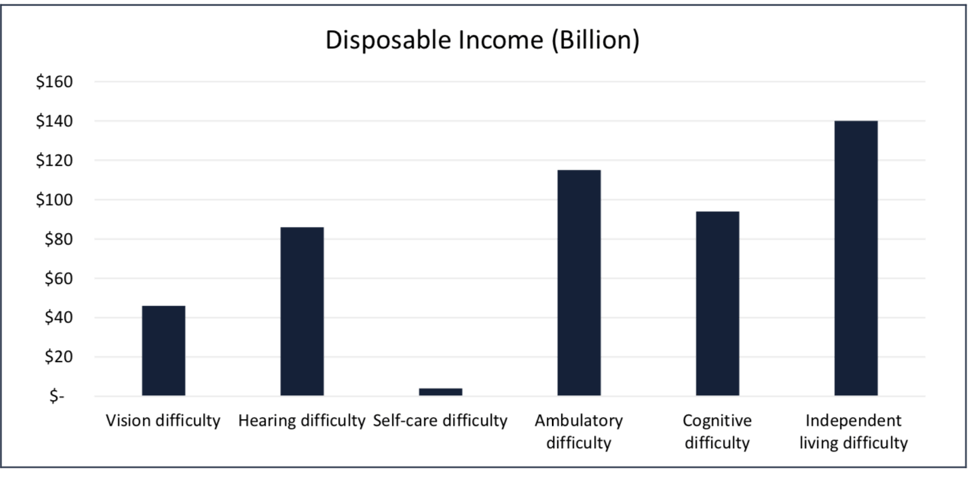
Approximately one in five people in the United States, or 64 million, have a disability.

Chart showing disposable income amounts in the billions for people with disabilities
Ranking disposable income in the billions for people with disabilities: Independent living difficulty $140 billion, Ambulatory around $118 billion, Cognitive at $98 billion, Hearing difficulty at $82 Billion, Vision difficult at $44 billion, and self-care disability at $4 billion.

The total after-tax disposable income for working-age people with disabilities is approximately $490 billion. For comparison, African Americans’ disposable income is $501 billion and for people of Hispanic origin, it is $582 billion.

In 2018, an estimated 165.8 million consumers shopped between Thanksgiving Day and Cyber Monday. So if we do the math, approximately 33.16 million (1 out of 5) consumers on Thanksgiving Day and Cyber Monday could be shoppers with disabilities. Furthermore, studies have shown that two-thirds of people with disabilities will abandon a website if it is inaccessible. However they don’t abandon the purchase – they simply buy from your competitor.

Not only does having an accessible website boost earning potential for your organization, but it improves your organization’s brand value. Younger consumers whose buying decisions are influenced by social justice will be less likely to trust your brand if your site is inaccessible. In fact, 9 out of 10 blind internet users are vocal anti-advocates for inaccessible companies.

It is important to note that mobile accessibility is also crucial for gaining people with disabilities as potential customers, as two-thirds of Thanksgiving weekend shoppers turned to their mobile devices to research and purchase holiday items.

Survey research data collected by the Rehabilitation Engineering Research Center for Wireless Technologies (Wireless RERC) indicate that 84% of people with disabilities own or use a cellphone or smartphone. When including tablets, that statistic raises the wireless device ownership rate for people with disabilities to 91%.

Avoid a costly complaint or lawsuit

If your site is inaccessible, you’re not only missing out on a huge, overlooked market, but you’re potentially at risk for a legal complaint or lawsuit. In fact, ADA Web Accessibility-Related Lawsuits exploded 181% – from 2017 (814) to 2018 (2285).

Real-world numbers from an accessibility-related lawsuit show that legal fees (not including settlement fees) alone could cost you more than $350,000…

Action Participant Hours/Participant Total Hours Extended Costs
Lawyers Assigned, Business Notified 8 2 16 $3,600.00
Outside Counsel Retainer (Estimate) $150,000.00
Initial Communication to Involved 45 2 90 $20,250.00
Hold Order Processing 45 3 135 $30,375.00
Outside Counsel Documents 8 8 64 $14,400.00
Initial Discover (Ordered by Judge) 10 24 240 $54,000.00
Status Meetings 7 10 70 $15,750.00
Prep Court Status Hearing 6 5 30 $6,750.00
Prep for Negotiation 6 5 30 $6,750.00
Negotiation 3 3 9 $2,025.00
Settlement Draft 5 5 25 $5,625.00
Settlement Draft Review 10 4 40 $9,000.00
Settlement Finalization 5 2 10 $2,250.00
Settlement Processing 3 2 6 $1,350.00
Hold Older Release 45 2 90 $20,250.00
Close Project, File, Documentation 8 8 64 $14,400.00
Litigation Grand Total $356,775.00

*A blended rate of $250/hour utilized in calculations.

Furthermore, accessibility complaints from unhappy customers can result in approximately $994,950 annually. Please see below for my calculations based on experience as a founder and owner of the Digital Accessibility Program Office for a Fortune 50 Insurance Company:

Action Participant Hours/Participant Total Hours Extended Cost
CSO/Email/Chat Receipt 1 .75 .75 $90.00
CSO/Email/Chat Accommodation 2 .75 1.5 $180.00
Documentation of Issue  1 .75 .75 $90.00
Processing of Issues 1 1.5 1.5 $180.00
Spool Up Fix Project 5 4.5 22.5 $2,700.00
Design 1 4.5 4.5 $540.00
Code 1 9 9 $1,080.00
QA 1 7.5 7.5 $900.00
Production Issuance 5 4.5 22.5 $2,700.00
Spool Down Project 5 2.5 12.5 $1,500.00
Customer Follow-Up 1 .75 .75 $90.00
Complaint Grand Total $10,050.00

A blended rate of $120/hour utilized in calculations.

Factors Calculations
Scale Factor of Design vs. Production Defect 100X
Proactive Fix Cost in Design $100.50
Reactive Fix Cost in Production $9,949.50
100 Complaints Per Year to Fix in Post Production Could Cost $994,950.00

Using previous IBM studies as a reference, the cost of fixing a defect in production can be as much as 100x more than addressing it in design or development.

Our estimated cost of activities is $10,050 – using this scale factor, it would have cost only $100.50 to fix this defect in the early design or development phase. By subtracting the proactive fix cost from the total reactive fix, you’ve got a loss of $9,949.50.

Even if your organization only receives 10 complaints a year, that’s about a $100,000 loss. With survey/research results showing visually impaired people using call centers for service and complaints about once per week, 100 complaints per year are not hard to imagine.

Next Steps

If your website is inaccessible, not only are you at risk for costly complaints or lawsuits, but you’re also missing out on a huge, overlooked market for your business. You can use the statistics above to make the business, fiscal, and legal case for your organization to invest in accessibility before holiday shopping begins. Below are a few simple steps your organization can take to start with accessibility:

  1. Start simple with free, open-source automated testing tools, such as axe. Such tools can catch between 30-50% of accessibility issues. Axe is also available as a browser extension for Chrome and Firefox, and there are axe tools for testing Android applications and iOS (coming soon).
  2. Contact us for consultation regarding other services, training, or tools that could help your organization on its accessibility journey.
Greg Williams

Greg Williams

Greg Williams is the Senior Vice President & Chief Architect at Deque Systems, Inc. He oversees program development and operations for some of Deque’s largest customers, helping them to build mature, sustainable accessibility programs.

Prior to joining Deque, Greg spent more than 30 years in the information technology field focusing on large, complex program operations for Fortune 40 companies and before that served in the United States Navy for a number of years. He had great success as the founder and owner of the Digital Accessibility Program Office for State Farm Insurance, building their practice from the ground up into one of the highest maturity level programs in the world between 2013 and 2018.

Greg has always been passionate about diversity and inclusion and has extended this passion to the disability and accessibility community - joining Deque Systems in 2018 to help launch and mature similarly successful programs across the globe.

In an ideal world, organizations would inherently practice accessibility because it is the right thing to do and because it is good for business. While organizations don’t explicitly go out of their way to create inaccessible content, it is oftentimes difficult to prioritize accessibility amongst constantly changing new technologies, tech stacks and development practices.

What most organizations don’t realize is that accessibility can unlock a huge, overlooked market share, reduce potential legal risk, lower operational costs, and boost brand value. If organizations only focus on one single aspect of return on investment, they’ll miss some very big positive factors that are a result of having an accessible digital presence.

These positive factors end up helping organizations control costs to the extent that the accessibility efforts can pay for themselves. And, if it’s really done right, accessibility can certainly become a competitive advantage, especially in the eCommerce space.

In this blog post, we’ll be focusing on all four aspects of ROI as they relate to accessibility: capturing an overlooked market share, risk management, lowering operational costs and boosting brand value.

1. Capture a huge, overlooked market share of $490 billion

The first aspect of ROI is that accessibility increases your company market share and increases eCommerce traffic. The total population of people with disabilities is large, and their percentage of disposable income matches their population size.

There are 20 million US working-age adults, roughly 35%, who report at least one disability. In fact, working-age adults who have a disability have a market share of about $490 billion. Comparatively, the African-American market segment is $501 billion, and the Hispanic market segment is $582 billion.

In a recent Nucleus Research report, researchers found that 2% of total eCommerce transactions are completed by people who are blind. This 2% is assuming that less than half of the blind population (which is 5 percent of the total population) are normal eCommerce shoppers and contribute that 2 percent share of total eCommerce. From these findings, we can infer that the total available market for consumers with visual impairments is about $10.3 billion.

Additionally, more than 70% of internet sites of the surveyed blind consumers had some type of critical accessibility blocker. This essentially means that they were either unable to register for the site or complete a purchase. So, if you’re an inaccessible eCommerce business, you could be losing out on up to $6.9 billion annually (70% of the $10.3 billion market share). To put that in perspective, Homedepot.com reported an annual revenue of $6.94 billion in 2018.

Consumers with disabilities who are unable to complete a transaction on a website or app will buy from somewhere else. Not only are you passing up the opportunity to do business with these folks, but you’re also giving your competitors that business by default.

2. Lower Operational Costs

Operational costs are the costs associated with running a business. Most businesses break out these costs by various channels to better understand their business and minimize costs. Most omnichannel organizations wish to push transactions to the digital space to minimize costs.

The four different channels for most organizations are:

  1. Walk-in, which would be a brick-and-mortar staff facility
  2. Call-in, which would be brick-and-mortar staffed call center (sometimes these are distributed call centers)
  3. Mail-in, which is another brick-and-mortar facility that is a staffed mail processing center
  4. Click-in, which is a virtual website digital transaction
Channel Type Target Transaction Percentage by Channel Actual Transaction Percentage by Channel
Walk-In Target 5% Actual 60%
Call-In Target 15% Actual 20%
Mail-In Target 20% Actual 15%
Click-In Target 60% Actual 5%

So, let’s calculate what it costs to take payment for each channel, assuming your organization takes 1.5 million payments a month.

Channel Type Actual Transaction Percentage Per-Unit Cost Total Cost (based on 1.5 Million transactions)
Walk-In Target 60% $15.00 $13.5 Million
Call-In Target 20% $7.50 $2.25 Million
Mail-In Target 15% $2.50 $562,500
Click-In Target 5% $.50 $37,500

If we take the actual percentages for each channel, multiplied by 1.5 million transactions, then take that total and multiply by the per-unit costs, the total cost is $16,135,000/month.

Now, let’s rethink these costs for an organization that decides to improve their accessibility to increase the number of click-in digital transactions for people with disabilities (who would otherwise be walking, calling, or mailing-in due to accessibility blockers).

Statistics show that of the total consumer base, 20-30% are people with disabilities. For a conservative calculation, we’ll assume that accessibility will increase click-in transactions by 10%. In these calculations, we’ll assume this 10% is distributed evenly by 3.33% from the other channels to the digital channels. The new operational costs will now be the following:

Channel Type Actual Transaction Percentage Per-Unit Cost Total Cost (based on 1.5 Million transactions)
Walk-In Target 56.7% $15.00 $12,757,500
Call-In Target 16.7% $7.50 $1,878,750
Mail-In Target 11.7% $2.50 $438,750
Click-In Target 15% $.50 $112,500

With accessibility improvements, the new total operational costs for 1.5 million transactions a month is $15,187,500/month. This is a monthly savings of $1,162,000 and an annual savings of $13,950,00. This revenue is more than enough to cover the costs of a sustainable accessibility program.

One last interesting fact regarding accessibility and operational costs is that internet users who are blind call a company’s customer service department an average of once a week because of website accessibility issues.

In fact, 90% of the interviewees reported that they regularly called customer service multiple times to report an issue, even though they had already abandoned the transaction. In short, if you have problems with accessibility in your digital channel, you are pushing more calls, more traffic, and more work to your call center even if consumers abandon the transaction.

3. Risk Management – Reduce Potential Legal Risk

From 2017 to 2018, web accessibility-related lawsuits skyrocketed 181%, forcing thousands of businesses to react and work toward reaching accessibility compliance in the most expensive and inefficient way possible.

Why the sudden increase? There are two potential factors. Number one is that the digital channel is becoming more important to everybody: companies, customers, or prospective customers. Number two, there is an increase in predatory litigation in this space– in other words, companies are being hit with demand letters or lawsuits from people who are looking for some type of a settlement. However, within these numbers, there are tons of legitimate customers or legitimate prospective customers who are simply trying to use a company’s products or services.

The other trend that we are seeing from these accessibility-related lawsuits is complaints that tend to be aimed towards retail, travel, hospitality, banking, entertainment, food service industry, banking/financial, and self-service sectors.\

Potential Cost of Accessibility Complaints

Real-world numbers from an accessibility-related lawsuit show that legal fees (not including settlement fees) alone could cost you more than $350,000.

Action Participant Hours/Participant Total Hours Extended Costs
Lawyers Assigned, Business Notified 8 2 16 $3,600.00
Outside Counsel Retainer (Estimate) $150,000.00
Initial Communication to Involved 45 2 90 $20,250.00
Hold Order Processing 45 3 135 $30,375.00
Outside Counsel Documents 8 8 64 $14,400.00
Initial Discover (Ordered by Judge) 10 24 240 $54,000.00
Status Meetings 7 10 70 $15,750.00
Prep Court Status Hearing 6 5 30 $6,750.00
Prep for Negotiation 6 5 30 $6,750.00
Negotiation 3 3 9 $2,025.00
Settlement Draft 5 5 25 $5,625.00
Settlement Draft Review 10 4 40 $9,000.00
Settlement Finalization 5 2 10 $2,250.00
Settlement Processing 3 2 6 $1,350.00
Hold Older Release 45 2 90 $20,250.00
Close Project, File, Documentation 8 8 64 $14,400.00
Litigation Grand Total $356,775.00

*A blended rate of $250/hour is utilized in calculations.

Potential Cost of Accessibility Lawsuit

Furthermore, accessibility complaints from unhappy customers can result in approximately $994,950 annually. Please see below for my calculations based on my experience as a founder and owner of the Digital Accessibility Program Office for a Fortune 50 Insurance Company: utilized in calculations.

Action Participant Hours/Participant Total Hours Extended Cost
CSO/Email/Chat Receipt 1 .75 .75 $90.00
CSO/Email/Chat Accommodation 2 .75 1.5 $180.00
Documentation of Issue  1 .75 .75 $90.00
Processing of Issues 1 1.5 1.5 $180.00
Spool Up Fix Project 5 4.5 22.5 $2,700.00
Design 1 4.5 4.5 $540.00
Code 1 9 9 $1,080.00
QA 1 7.5 7.5 $900.00
Production Issuance 5 4.5 22.5 $2,700.00
Spool Down Project 5 2.5 12.5 $1,500.00
Customer Follow-Up 1 .75 .75 $90.00
Complaint Grand Total $10,050.00

A blended rate of $120/hour is utilized in calculations.

Factors Calculations
Scale Factor of Design vs. Production Defect 100X
Proactive Fix Cost in Design $100.50
Reactive Fix Cost in Production $9,949.50
100 Complaints Per Year to Fix in Post Production Could Cost $994,950.00

Using previous IBM studies as a reference, the cost of fixing a defect in production can be as much as 100x more than addressing it in design or development.

Our estimated cost of activities is $10,050 – using this scale factor, it would have cost only $100.50 to fix this defect in the early design or development phase. By subtracting the proactive fix cost from the total reactive fix, you’ve got a loss of $9,949.50.

Even if your organization only receives 10 complaints a year, that’s about a $100,000 loss. With survey/research results showing visually impaired people using call centers for service and complaints about once per week, 100 complaints per year are not hard to imagine.

4. Boost Brand Value – Aligning Your Business with Your Core Values

Today’s consumers consider the business’s core value when they are making their buying decisions. In fact, seven in ten US Millennials actively consider company values when making a purchase – compared with 52% of all US online adults. But it’s not just Millenials who are making value-based consumer decisions. A majority of Gen X consumers explicitly evaluate company values during a purchase, with four in ten young boomers following behind.

Most company core values include words like inclusivity, ease of use, always there, etc. If your company’s mission is to be inclusive, connected, customer-driven, simple, helpful, and customer?centric, how can accessibility not be a part of that? How can you have a company motto or core values that revolve around inclusivity and be excluding or potentially excluding a significant portion of the population of people who want to do business with your company?

In fact, 9 out of 10 blind Internet users are vocal anti-advocates for inaccessible companies, meaning their friends and family members are also making value-based buying decisions and choosing your competitors if your company’s website or application is inaccessible.

In Conclusion

We all wish we lived in an ideal world where accessibility was taught to all developers and treated the same priority as other functional requirements, like security. While accessibility is becoming more and more important and gaining adoption, it is still something that requires additional convincing while companies are in the early stages of building their accessibility programs. The four business reasons above are great data points to take to your executives in order to start advocating for and building a sustainable program for accessibility.


Greg Williams

Greg Williams

Greg Williams is the Senior Vice President & Chief Architect at Deque Systems, Inc. He oversees program development and operations for some of Deque’s largest customers, helping them to build mature, sustainable accessibility programs.

Prior to joining Deque, Greg spent more than 30 years in the information technology field focusing on large, complex program operations for Fortune 40 companies and before that served in the United States Navy for a number of years. He had great success as the founder and owner of the Digital Accessibility Program Office for State Farm Insurance, building their practice from the ground up into one of the highest maturity level programs in the world between 2013 and 2018.

Greg has always been passionate about diversity and inclusion and has extended this passion to the disability and accessibility community - joining Deque Systems in 2018 to help launch and mature similarly successful programs across the globe.