Imagine that you have a visually impaired customer who wants to use your bank’s mobile app, but they can’t because the buttons aren’t labeled in a way they can understand. Or consider an elderly customer with shaky hands struggling to navigate your ATM touchscreen. These scenarios highlight the everyday challenges faced by millions of people in India when accessing digital banking services.

These are also the factors that influence which banking institutions people with disabilities choose to do business with. With over 2.7 crore people with disabilities in India, the need for digital accessibility in banking is both a legal requirement and a moral imperative. This article will provide you with a comprehensive understanding of why digital accessibility in the Indian banking sector is crucial and will include key statistics and an overview of current laws and regulations to help you recognize the significant benefits of implementing inclusive practices.

Why digital accessibility matters

Approximately 2.7 crore people living in India have a disability. This is a significant portion of the population that banks cannot afford to overlook. Making banking services accessible not only helps people with disabilities but also opens up a potential market worth $8 trillion globally, as highlighted by the Global Economics of Disability Report.

Key statistics

Year-on-year transaction volume growth going from 56% in 2022-2023 to 200% in years 2026-2027
Digital Transactions: The usage of digital payments in India is rapidly increasing, with a year-on-year transaction volume growth of 56% in FY 2022–2023. It is projected to expand fourfold by FY 2026–2027. However, many people with disabilities find these platforms challenging due to poor accessibility features.


15% of total banks in India are WCAG compliant
Banking Accessibility: A study by the Reserve Bank of India (RBI) found that only 15% of Indian banks fully comply with the Web Content Accessibility Guidelines (WCAG).

A survey by the Click-Away Pound Report found that 71% of customers with disabilities will leave a website that is not accessible. This means banks are potentially losing a substantial number of customers simply because their digital services are not user-friendly. These customers don’t stop banking; they go to another bank that is accessible.

These numbers underscore the everyday challenges millions of people in India face when accessing digital banking services. Barriers such as poor website navigation, non-compatible mobile apps, and inaccessible ATM interfaces create significant obstacles for those with disabilities. These issues need to be addressed urgently to foster a more inclusive society. By prioritizing digital accessibility, banks can ensure that all individuals can navigate their financial lives confidently and easily, regardless of their abilities. Additionally, improving accessibility opens up significant market opportunities by attracting a broader customer base—including people with disabilities—and helps banks avoid legal risks associated with non-compliance to accessibility regulations. 

Regulatory framework and guidelines

Accessible India Campaign, RBI guidelines, Information Technology Act, 2000, Rights of Persons with Disabilities Act, 2016, Bureau of Indian Standards Guidelines, GIGW Guidelines

India has laws and guidelines to promote digital accessibility in banking. To avoid legal issues, banks must understand and follow these regulations. Compliance with these laws ensures banks meet their obligations and build customer trust. Expert consulting can help banks navigate these regulations effectively, ensuring full compliance and improving their digital accessibility efforts.

  • Rights of Persons with Disabilities Act, 2016 (RPwD Act): This law mandates accessibility standards across various sectors, including banking. The Ministry of Finance has issued “Accessibility Standards and Guidelines for the Banking Sector” to ensure inclusive services.
  • RBI Guidelines: The Reserve Bank of India has issued guidelines to enhance banking accessibility, such as accessible ATMs, ramps for wheelchair users, and screen reader-compatible services.
  • Bureau of Indian Standards (BIS) Guidelines: BIS has developed standards to ensure digital banking services are accessible, aligning with the RPwD Act.
  • Accessible India Campaign: Launched by the government, this campaign aims to make all government websites and apps accessible to people with disabilities by 2025.
  • Information Technology Act, 2000: This act includes provisions for making electronic and digital services accessible to all.
  • GIGW Guidelines: The Guidelines for Indian Government Websites (GIGW) ensure that government websites, including those in the banking sector, follow international best practices in web accessibility, usability, and user-centric design, making them accessible to all users, including those with disabilities.

Benefits of digital accessibility

Investing in digital accessibility in banking offers numerous benefits:

  • Increased market reach: Accessible digital platforms allow banks to attract a broader customer base, including people with disabilities. This expands the market and opens up new revenue streams, tapping into an underserved demographic with significant financial potential. Customers who encounter inaccessible sites and apps will not stop needing banking services; instead, they will take their business to banks that prioritize accessibility. By ensuring their services are accessible, banks can retain these customers and avoid losing them to more inclusive competitors.
  • Compliance with regulations: Adhering to accessibility guidelines helps banks avoid legal issues and ensures compliance with national and international standards. This proactive approach mitigates the risk of litigation and aligns with evolving legal frameworks promoting inclusivity.
  • Enhanced user experience: Accessible digital platforms are easier for everyone to use, leading to increased customer satisfaction. By removing barriers, banks can create seamless, intuitive experiences that benefit all users, regardless of their abilities. These positive experiences encourage repeat usage, leading to higher customer retention and loyalty over time. When customers find banking easy and enjoyable, they are more likely to use the services frequently and for longer periods, enhancing both customer acquisition and retention.
  • Positive brand image: Demonstrating a commitment to inclusivity and accessibility enhances a bank’s reputation. Customers appreciate businesses prioritizing social responsibility, and an inclusive approach can foster loyalty and trust. Increasingly, consumers choose brands that align with their values. A strong commitment to accessibility signals that a bank values inclusivity and social responsibility, attracting and retaining customers who prioritize ethical business practices. This alignment with consumer values not only builds trust but also differentiates the bank in a competitive market.
  • Technological advancements: When you bring in advanced digital accessibility tools, you’re leveraging the power of transformational technologies like AI and machine learning to accelerate innovation, drive positive change, and deliver business value. Technologies like AI and machine learning can enhance accessibility features, such as real-time text-to-speech conversion for visually impaired users.

Challenges and opportunities for achieving digital accessibility

Ensuring digital accessibility in the banking sector presents several challenges but also offers ample opportunities:

Lack of awareness and understanding

  • Challenge: Many banks are unaware of the importance of digital accessibility and the needs of people with disabilities. This lack of awareness can lead to the exclusion of a significant portion of the potential customer base.
  • Opportunity: Raising awareness can lead to the development of inclusive services, attracting and retaining more customers and enhancing market reach. Awareness campaigns and training can highlight the value of accessibility, promoting a culture of inclusion and improving customer satisfaction.

Technical challenges

  • Challenge: Implementing digital accessibility requires significant technical adjustments, such as updating legacy systems and ensuring compatibility with assistive technologies.
  • Opportunity: Overcoming these challenges can position a bank as a leader in innovation and accessibility, providing a competitive edge. Investing in modern, accessible technology can attract tech-savvy customers and those with disabilities, expanding the customer base.

Design and usability issues

  • Challenge: Creating user-friendly and accessible designs involves careful consideration of various factors.
  • Opportunity: Addressing these issues not only meets accessibility standards but also improves the overall user experience, benefiting all customers. Enhanced usability can lead to increased customer satisfaction, loyalty, and more frequent use of banking services.

Continuous improvement and testing

  • Challenge: Digital accessibility is an ongoing process that requires regular testing and updates.
  • Opportunity: Regularly testing platforms for accessibility issues and making continuous improvements based on user feedback and technological advancements keeps the bank responsive to customer needs, fostering customer trust and retention. This iterative process ensures that the bank stays ahead of regulatory requirements and industry standards.

Integration of assistive technologies

  • Challenge: Integrating assistive technologies into digital platforms can be intensive.
  • Opportunity: Successful integration leads to a more inclusive environment, broadening the bank’s customer base and opening new revenue streams. Embracing technologies like AI-driven accessibility tools can enhance the banking experience for all users, showcasing the bank’s commitment to innovation.

Training and development

  • Challenge: Investing in staff training to understand and support accessibility requirements is crucial, but it requires executive buy-in and strategic planning.
  • Opportunity: A well-trained team can effectively implement and maintain accessibility standards, enhancing the bank’s reputation for inclusivity. Continuous education programs can keep staff updated on best practices, ensuring consistent delivery of accessible services.

Feedback and iteration

  • Challenge: Establishing channels for receiving feedback from users with disabilities and making iterative improvements are essential, but these channels need to be monitored and managed, and interactions need to be helpful and positive.
  • Opportunity: Engaging with customers through feedback channels helps banks stay attuned to the needs of all customers, fostering loyalty and trust. This ongoing engagement can lead to better-designed products and services, improving the overall customer experience.

By addressing these challenges with a comprehensive approach that combines technical solutions, regulatory compliance, user-centered design, and a commitment to continuous improvement, banks can create inclusive digital experiences that benefit all customers. This balanced approach not only addresses immediate challenges but also leverages opportunities for growth, innovation, and enhanced customer loyalty.

Conclusion

Imagine a future where your bank not only meets regulatory requirements but also stands at the forefront of digital innovation and social responsibility. This isn’t just about compliance—it’s about capturing a market that is eager to engage, ensuring no customer is left behind, and setting a new standard in financial services. Leadership in accessibility translates to enhanced customer loyalty, a broader customer base, and a stronger market position. The numbers are clear: inclusivity is not just the right thing to do—it’s a smart business strategy.

Ready to make your banking services more accessible and inclusive? Contact Deque today for a comprehensive digital accessibility audit.


Abin Choudhury

Abin Choudhury

Abin is the Vice President Sales, APAC at Deque Systems. He has completed his CFO program from IIM, Calcutta, and his MBA (Marketing) from MIT, Pune. Abin has over 18+ years of experience in Consultative Sales, Marketing, Business Development, and IT Operations, being a startup founder with solid entrepreneurial expertise to foster revenue growth, scale teams, and nurture organizational culture. Abin believes in a journey of continuous learning, intellectual curiosity, strong customer empathy, consultative selling, and ongoing professional relationships. He defines turnaround strategies to drive significant revenue growth, building a strong sales team with corporate vision and operational integrity. His expertise lies in leading sales development efforts, servant leadership, active strategies, and improvement initiatives to achieve defined goals and setting up the go-to-market plan. Through his experience, he is adept at overseeing various operational and fiscal responsibilities to ensure optimal business performance and significant revenue enhancements. In addition, he enjoys traveling (Driving by road for hours), writing blogs, exploring spiritual concepts, thinking of new ideas, learning about various entrepreneurs’ success stories, and constantly thinking about the subsequent ideas to solve more real-world problems.

Let me start by saying that I love my job. Why? Because I spend every week talking to our customers about digital accessibility. It’s my passion, and I love sharing my perspectives and experience with people who are working to build digital accessibility programs at their companies. I help them identify their challenges and opportunities, and I work with them to set and achieve their digital accessibility goals.

Over the past couple of weeks, I’ve had at least three customer conversations that were triggered by an article in the Wall Street Journal titled The Law Firm Hitting Businesses With Thousands of Disability Suits.

If you have a Wall Street Journal subscription, you can review the article yourself. But if not, what I can tell you is that it’s very understandable why any business owner who reads it would feel concerned. One single law firm alone filed more than 1,000 digital accessibility cases in the US just last year!

When you examine these lawsuits, it’s very clear that there’s a kind of “cut and paste” approach being used, with the goal being to file as many lawsuits as possible in hopes of securing quick financial settlements.

While many digital accessibility lawsuits can be well-intentioned, the kinds of actions described in this article are not helpful. They’re not making the web more accessible and inclusive to all, which is what really matters. And they’re actually wasting money that could be spent on improving digital content.

I’m particularly troubled by the possibility that lawsuits of this kind could come to be perceived as a “necessary evil.” If a lawsuit is demanding a quick financial settlement, companies may look at the situation and think that it will ultimately be cheaper to settle the lawsuit than to put in the work to make their content accessible.

This is problematic for many reasons, the main one being that it’s not true!

I conducted a study several years ago, looking at Fortune 50 companies that had been through a digital accessibility lawsuit process. My goal was to examine in minute detail the level of effort and cost it took to handle one of these predatory lawsuits, with a particular focus on those lawsuits that were settled quickly for a fairly low amount.

I expected there to be hidden costs that would add up, but even so, I was still surprised by the results.

When we calculated the final total costs that the average company spent on all the actions required upon receiving a lawsuit—which included securing external counsel who were experts in the digital accessibility field and licensed—we found totals of up to $350,000 or more!

(You can learn more about the results of this study in this Deque webinar: The Real Cost of Accessibility Complaints and Lawsuits)

One of the examples cited in the Wall Street Journal article involves a lawsuit filed against a small electric bike company. The proposed settlement was for $4,950. But to get to that negotiated number, the electric bike company had to pay approximately $46,000 in legal fees! That’s more than double the cost of simply fixing the content in question. Updating their websites only cost $13,000.

When I read this, it all felt very familiar. Over the years, I’ve collected so many similar stories where the legal fees and administrative costs were exponentially higher than the settlements themselves. The notion that settling will save money is a fallacy, and so is the notion that getting and staying accessible now will be more expensive than dealing with any legal issues later.

As the Wall Street Journal article makes clear, lawsuits aren’t going away. In fact, they’re becoming more and more common. Some companies even get targeted more than once. Continuing to pay out to try and settle just isn’t feasible. Your company will always be on the defensive and always paying out more than it needs to.

Fortunately, there’s a better way.

The best defense is a good offense. Don’t wait to get sued, and then sued again. Don’t pay out more than you have to as you defend your organization against predatory lawsuits that impose high hidden costs under the guise of quick settlements. Instead, invest in digital accessibility now and avoid future lawsuits altogether. You’ll pay less overall, and the benefits to your company will last for the long term. Plus, you’ll be doing the right thing by making your content more inclusive and accessible to all, which is the real goal!

Greg Williams

Greg Williams

Greg Williams is the Senior Vice President & Chief Architect at Deque Systems, Inc. He oversees program development and operations for some of Deque’s largest customers, helping them to build mature, sustainable accessibility programs.

Prior to joining Deque, Greg spent more than 30 years in the information technology field focusing on large, complex program operations for Fortune 40 companies and before that served in the United States Navy for a number of years. He had great success as the founder and owner of the Digital Accessibility Program Office for State Farm Insurance, building their practice from the ground up into one of the highest maturity level programs in the world between 2013 and 2018.

Greg has always been passionate about diversity and inclusion and has extended this passion to the disability and accessibility community - joining Deque Systems in 2018 to help launch and mature similarly successful programs across the globe.

When it comes to filling out an online form, we all want pretty much the same thing: clear instructions, a quick process, and a seamless experience.

For people with disabilities, having this kind of positive experience is made possible when someone has done the work of making the form accessible.

As an accessibility expert, when I fill out an online form, I’m always thinking about the experience. How easy were the instructions to follow, and how clear and straightforward was the process? Would someone with a visual or motor disability have the same experience I did?

Just the other day, I tried to fill out a form on a travel site. I was amazed by the quality of the experience. Using an assistive device, I was able to fill in all the details on that travel site within five minutes without any confusion or errors along the way.

Do you know what made this possible?

It was because the form had descriptive labels that were consistent and present at all times. The form marked all of the mandatory fields, provided instructions that were easy to follow, grouped relevant form fields that clearly defined the purpose of those fields, and used minimal placeholders that gave necessary hints. Above all, the form communicated the role, name, and state of the form controls to the assistive technology that I was using.

In this post, we’re going to learn some techniques for how to create these kinds of accessible experiences. But before we get started, I recommend reading two of our previously published posts on this topic:

  1. The Anatomy of Accessible Forms: The Problem with Placeholders
  2. The Anatomy of Accessible Forms: Required Form Fields

In today’s post, we will go through all the ingredients of creating an accessible form that provides the best user experience for all users. We will go through each aspect of creating an accessible form, understand why a particular step is important, and how it affects people with disabilities or users in general.

Use native HTML

The first rule for creating a truly accessible form is to use native HTML form controls as much as possible. Most of them are accessible by default with all assistive technologies, and they are semantically correct.

Let’s look at some examples of native form elements:

<input type=”text”>

<input type=”radio”>

<input type=”checkbox”>

<button>Submit</button>

Since we’re using the native HTML controls, the name, role, and state of the elements are exposed by default to all assistive technologies. If we create a custom control using WAI-ARIA techniques, however, all of these elements need to be provided manually using various ARIA attributes like aria-label, aria-checked, and role= “radio.”

Provide a visible label

The next step in the process is to provide visible labels for each form control. Without visible labels, form controls are not usable to any user, let alone a person with a disability. A visible label is simply text that is in close proximity to the form control that it is representing.

<strong>First Name</strong>

<input type=”text”>

<strong>Terms & Conditions</strong>

<input type=”checkbox”>

In the example code above, I have used a strong tag to highlight the labels so that users can distinguish them easily.

Since we are talking about visible labels, we should also address placeholder attributes.

For some input types, we can use the placeholder attribute—but this is not the same as providing a visible label! The placeholder disappears once the user inputs data into the form. To learn more about the pitfalls of using placeholder attributes, you can read The Anatomy of Accessible Forms: The Problem with Placeholders.

Include programmatic labels

Now that we have understood why we need visible labels and, we also need to associate them programmatically to their form controls. Without the programmatic association of the labels, assistive technology users cannot identify the purpose of the form field.

When a user’s focus moves into a text field, it is read out as “edit field” without notifying the accessible name provided to it. To make sure that the visible accessible name is notified to the users we need to programmatically associate the visible label with a form field.

<label for=”firstname”>First Name</label>

<input type=”text” name=”firstname” id=”firstname”>

<label for=”lastname”>Last Name</label>

<input type=”text” name=”lastname” id=”lastname”>

In the above example, we have used the “for and id” method to associate the form field with its visible label. While there are multiple ways to achieve the programmatic association, using the id method is recommended.

Provide descriptive labels

Now that we have provided visible labels and associated them with their respective form fields, the next step is to check if the form labels are descriptive enough. Will the user be able to read through the label, understand the purpose, and perform the successful action? For example:

<label>Name</label>

<input type=”text”>

<input type=”text”>

In the above example, we can see that for both form fields, the visible label is “name.” This is not descriptive enough for the users to take necessary action. Each form field should contain its own visible label and it should be descriptive. We can improve the example above by providing visible labels for both form fields and specifying where the first name and last name should be entered:

<label for=”fname”>First Name</label>

<input type=”text” name=”firstname” id=”fname”>

<label for=”lname”>Last Name</label>

<input type=”text” name=”lastname” id=”lname”>

Group form controls

Sometimes, there will be a set of form controls that belong to a group and are provided with a group-level visible label to provide context. The group-level visible label conveys the necessary information to the users so they can take action. Let’s understand this with an example:

<p>Do you have a passport</p>

<input type=”radio” name=”passport” id=”yes”>

<label for=”yes”>Yes</label>

<input type=”radio” name=”passport” id=”no”>

<label for=”no”>No</label>

In the above example, we can see that “do you have a passport” is the primary group level visible label for the set of radio buttons. But when assistive technology users navigate to these radio buttons, they miss the key information provided by the primary group level visible label because it doesn’t receive keyboard tab focus.

In addition, the elements “Yes” and “No,” when read out alone by assistive technology, don’t make sense. To help with this problem in HTML, we use fieldset and legend attributes to help us bind the group-level form controls. These attributes will be announced to assistive technology users as expected. Here is the same example with fieldset and legend:

<fieldset>

<legend>Do you have a passport</legend>

<input type=”radio” name=”passport” id=”yes1”>

<label for=”yes1”>Yes</label>

<input type=radio” name=”passport” id=”no1”>

<label for=”no1”>No</label>

</fieldset>

In the example above, we can see that fieldset is binding the form controls inside a group and the legend attribute is used as the primary group level visible label that will be exposed when the assistive technology user moves the focus to the first radio button either in tab or shift+tab navigation.

Provide instructions

Some of the form fields need additional instructions to fill the data successfully. These instructions must be available to the users at all times like visible labels. We can bind the instruction to the form fields using an aria-describedby attribute.

<label for=”dob”>Date of Birth</label>

<input type=”text” aria-described=”dob1” id=”dob”>

<span id=”dob1”>MM/DD/YYYY</span>

In the above example, the instruction is provided below the form field and is bound using an aria-describedby to the text field. If the instruction is not bound to form fields, then assistive technology users who use the tab key navigation might miss the key information.

Identifying form inputs purpose

Accurately entering information into form fields can be difficult, especially for people with cognitive disabilities. The purpose of a text field that is collecting the data specific to the user can be programmatically identified using the HTML autocomplete attribute. This technique can also help to personalize the interface by replacing or augmenting form input labels with words from a defined vocabulary, or even graphical symbols.

<label for=”fname”>First Name</label>

<input type=”text” name=”firstname” id=”fname”> autocomplete=”given-name”>

In the above example, the autocomplete attribute on the input form field helps the user agent to recollect the first name. This makes filling out forms easier and less likely to result in errors, especially for people who may have trouble accurately remembering, reading, or typing information.

Provide accessible name

Some form fields might need a programmatic name to help understand the purpose of the field better and perform actions apart from visible text labels. However, we need to ensure the programmatic name does not override the visible text label completely. We want it to complement and enhance the user experience, especially for speech-input users who attempt to use the visible text label as a means of navigation or selection when interacting with form fields:

<label for=”bday”>Date of Birth (MM/DD/YYYY)</label>

<input type=”text” aria-label=”Birthday” id=”bday”>

In the above example, the user not only doesn’t get important instructions, but they’re likely to be confused about what the ideal input is for this form field. We have to include the visible text label as part of the accessible name, and it’s a best practice to start with a visible label.

<label for=”search”>Search</label>

<input type=”text” aria-label=”Search by City, State or Zipcode” id=”search”>

In the above example, the accessible name complements the visible text label and helps users to better understand the purpose of the form field and what information to enter.

Summary

Following the best practices above will enable you to create a form that is usable and accessible to all users. And remember, native HTML is the key to creating positive user experiences!

Uday Shetty

Uday Shetty

Uday is a Senior Accessibility Consultant and Coach at Deque Systems. He has over 11 years of experience in helping clients make their digital content accessible to all users, especially those with disabilities. Uday is a Certified Professional in Accessibility Core Competencies (CPACC). As a coach, Uday guides and trains diverse teams on accessibility skills and best practices, and help them adopt a shift-left approach in their software development life cycle (SDLC) process. As a consultant, he conducts accessibility testing and assessment of various digital content, such as web, mobile, native, hybrid apps, documents, wireframes, and visual designs, using WCAG, EN 301-549, and Section 508 standards, and various assistive technologies, such as screen readers, magnifiers, and switch devices. He also creates Voluntary Product Accessibility Templates (VPATs) and Conformance Statements to document and communicate the accessibility compliance of the products. Uday's passion and mission is to make the digital world more inclusive and accessible for everyone.

Welcome to the third installment of our in-depth exploration of the European Accessibility Act (EAA). As we navigate the complexities, regulatory requirements, and potential impacts of this landmark act, our goal is to provide you with actionable guidance so your organization can drive the changes necessary to achieve EAA compliance.

Our first post in the series, An introduction to the European Accessibility Act (EAA), provided an overall look at the EAA’s scope, and in our follow-up, How the European Accessibility Act (EAA) will impact product accessibility, we took a deeper dive into the EAA’s impact on how products are offered.

In today’s post, we’ll delve into implications, risks, and strategies for service providers.

Services

The EAA significantly impacts how services are provided under its regulations. To maximize accessibility for individuals with disabilities, the EAA emphasizes providing information about the service’s operation and any products used in its delivery, ensuring compatibility with assistive technologies. This includes details about product accessibility features and their interactions with the service. Furthermore, the EAA mandates that service providers make their websites, online applications, and mobile-based services accessible.

General requirements related to services

Section III of Annex I outlines general accessibility requirements for all services covered by the directive, such as:

Information about the service

The directive emphasizes the importance of making information about the service and its accessibility readily available throughout provision of the service. This includes details about how it operates, information about the functioning of the service, any products used in its delivery, and specific accessibility features. This information should be presented in various formats to cater to different needs and be easily accessible to individuals with disabilities.

Note: While the directive doesn’t specifically describe promotional marketing websites in these general requirements, content within the sales funnel journey could be considered an aspect of the provision process of a service.

Compatibility and assistive technologies

Service providers are obligated to ensure compatibility with various assistive technologies that individuals with disabilities might use. This includes screen readers, alternative input devices, keyboard only navigation, and other tools facilitating access to digital content and functionalities.

Accessibility of digital platforms

A key requirement is ensuring the accessibility of websites, online applications, and mobile device-based services. These platforms, particularly those within the categories detailed in the following sections, should be designed and developed in a way that makes them perceivable, operable, understandable, and robust for users with disabilities.

Accessible support services

The directive also highlights the need for accessible communication channels for support services related to the provided e-commerce services. This encompasses making help desks, customer support, training materials, self-serve complaint and problem reporting, user journey flows, and other resources accessible to ensure individuals with disabilities can easily seek assistance and information.

Television and streaming services

Television and Streaming Services, particularly those offering features such as subtitles, audio descriptions, and sign language interpretation, are considered “services providing access to audiovisual media services.” The EAA emphasizes the importance of providing information about the accessibility of television and streaming services clearly and accessibly.

The directive mandates that these services, along with their associated consumer terminal equipment like smart TVs and streaming devices, must adhere to specific accessibility standards.

E-commerce services

The EAA defines “e-commerce services” as services provided at a distance through websites and mobile device-based services. These services are initiated electronically at the request of a consumer and aim to facilitate a consumer contract. The directive clarifies the following:

  • “At a distance” implies the service is delivered without both parties physically present.
  • “By electronic means” signifies electronic equipment is used for the initial transmission and reception of the service.
  • “At the individual request of a consumer” means the service is provided upon individual demand.

Broad applicability of “e-commerce”

The EAA’s definition of “e-commerce services” is expansive, encompassing “services provided at a distance, through websites and mobile device-based services by electronic means and at the individual request of a consumer with a view to concluding a consumer contract.”

This definition would be applicable to almost any type of website or mobile application facilitating almost any kind of transaction. Examples include:

  • Purchasing goods in an online store
  • Bidding on an item through an auction site
  • Booking accommodations
  • Signing a utility contract or paying a bill
  • Enrolling in a course or training program

Information accessibility is crucial

Regardless of the specific type of e-commerce service, the EAA emphasizes making service content accessible to users with disabilities. For instance, product descriptions, auction details, reservation systems, course information, and contract terms should all be designed and presented to be perceivable, operable, and understandable to individuals with varying abilities.

Core functionalities must be accessible

The EAA’s focus on compatibility with assistive technologies is particularly relevant. Because of this, some core functionalities have been called out in more detail and may need some special scrutiny. For example:

  • E-commerce sites: Users relying on screen readers should be able to navigate product listings, input payment details, and complete purchases.
  • Auction sites: Bidding mechanisms must be accessible, potentially requiring alternative input methods or text-to-speech functionalities.
  • Transportation Services: Booking platforms for flights, trains, and other transportation must ensure individuals with disabilities can access and use reservation systems effectively.

Banking services

The EAA directly addresses the accessibility of consumer banking services as a key area of focus. And  defines “consumer banking services” to include:

  • Credit agreements: This encompasses consumer credit products and extends to products like personal loans and mortgages.
  • Investment and insurance services: The directive incorporates various financial services, including investment services, portfolio management, investment advice, insurance-based investment products, and more.
  • Payment services: Services such as executing payment transactions, operating payment accounts, and money remittance.
  • Payment accounts: Services that are linked (or associated), such as access to checking account information, account switching, and access to basic account features, are considered to be in scope.
  • Electronic money: The directive covers electronic money services, which includes issuing electronic money. This is relevant to aspects like pre-paid cards and digital wallets.

Key accessibility requirements for banking services

The directive sets out overarching accessibility obligations that apply across consumer banking. Here’s a breakdown:

Perceivable, Operable, Understandable, Robust
The EAA mandates that consumer banking services, including their digital interfaces (websites and mobile applications), must adhere to the four principles of accessibility known as POUR:

  • Perceivable: Users must be able to perceive the information being presented (it can’t be invisible to all of their senses).
  • Operable: Users must be able to operate the interface (the interface cannot require interaction that a user cannot perform)
  • Understandable: Users must be able to understand the information as well as the operation of the user interface (the content or operation cannot be beyond their understanding)
  • Robust: Users must be able to access content robust enough that it can be interpreted reliably by a wide variety of user agents, including assistive technologies, and the content should remain accessible even as technologies advance.

Accessible identification and security
Identification methods, electronic signatures, security features, and payment services within consumer banking must also comply with these four accessibility principles.

Example: A bank’s online platform should enable a blind customer to use their own assistive technology like a screen reader to navigate authentication steps, electronically sign documents, and authorize transactions securely.

Understandable information
The EAA emphasizes that information provided in consumer banking services must be understandable, adhering to a specific language complexity level (Level B2 — upper-intermediate) defined by the Council of Europe’s Common European Framework of Reference for Languages.

Example: This could mean presenting financial product terms and conditions in a clear and concise manner, avoiding jargon or overly technical language that could be challenging for some users to understand.

Passenger Transport Services

For passenger transport services by plane, bus, train, and water, there is existing EU law relating to passenger rights that already covers some aspects of accessibility in transport. The directive builds upon these existing regulations, introducing additional requirements to further enhance accessibility for all passengers. The EAA highlights several key areas where accessibility should be improved.

Websites and mobile applications

Operators of these transport services are obligated to make their websites and mobile apps accessible, ensuring individuals with disabilities can easily access information, book tickets, and manage their travel arrangements.

Electronic ticketing

Electronic tickets and electronic ticketing services must be designed with accessibility in mind, allowing passengers with disabilities to purchase and use tickets independently.

  • Electronic tickets are systems where the right to travel, in the form of single or multiple travel tickets, travel subscriptions, or travel credit, is stored electronically on a physical transport pass or other devices rather than a paper ticket.
  • Electronic ticketing services are systems where passengers buy tickets, including online using an interactive computing device. Tickets are delivered electronically so they can be printed or shown on an interactive mobile device when traveling.

Real-time travel information

This encompasses providing accessible real-time travel information through various channels, including websites, mobile apps, and interactive information screens. This includes details like timetables, delays, platform changes, connecting services, and accessibility features of vehicles and infrastructure. Delivery of this real-time travel information should maximize its use by persons with disabilities.

Interactive self-service terminals

Interactive self-service terminals located within the EU and used for passenger transport services must comply with accessibility requirements. These terminals are often used for purchasing tickets, checking in for travel, and accessing travel information.

Conclusion

The implementation of the EAA presents challenges and opportunities for both product and service providers, and while it represents a powerful shift toward societal inclusivity, there are very real regulatory and legal implications that businesses need to address in order to achieve compliance and avoid risk.

The European Accessibility Act (EAA) is now transposed into national law in most EU member states and will come into effect on June 28, 2025. If you’re an EU-based organization or do business within the EU, Deque can help ensure you meet EAA requirements:

Choose Deque as your EAA compliance partner, and together, we can help create a world where everyone can thrive.

Additional resources

Read answers from our experts to many of the most important EAA questions here:
European Accessibility Act (EAA): Top 20 Key Questions Answered

Watch our recent EAA webinar, please visit:
Countdown to enforcement 2025: Navigating the European Accessibility Act 

Find official language of the directive here:
European Accessibility ACT (EAA)

Sections of the EAA referenced in this post include:

Derrin Evers

Derrin Evers

Derrin Evers is a Senior Solution Consultant at Deque Europe. Derrin’s background and experience spans from design to development, small agencies to large enterprises, and public sector to private business from North America to Europe. With the professional goal to promote positive change within software development through digital accessibility, Derrin helps Deque customers discover, plan, and realize their potential through strategic and technical support across the software development lifecycle.

For everyone in the disability community, it was a milestone event: July 26, 1990. That was the day President George H.W. Bush signed the Americans with Disabilities Act (ADA) into law.

34 years later, it’s a date known around the world, because the ADA literally changed the world. We see its ongoing influence everywhere, perhaps most notably in the European Accessibility Act (EAA), a sweeping piece of legislation that will become national law in all 27 EU member states next year.

In 1998, when Tony Coelho testified at the 1998 ADA hearings, he concluded with these powerful words:

“That’s what this bill is all about. 36 million Americans deciding it’s time for us to stand up for ourselves. To make a difference. To say that we want our basic civil rights. We deserve it. Give us an opportunity to do what we can do. Don’t keep telling us what we can’t do.”

Today, in 2024, Tony Coelho is every bit as impassioned about inclusion and disability rights as he was when, as a Democratic member of the United States House of Representatives, he was the act’s primary sponsor.

Glenda Sims, Deque’s Chief Information Accessibility Officer, recently had the opportunity to chat with Tony to discuss his life, his work, where we are today, and what he sees coming next. And, of course, the 34th anniversary of the ADA!

You can see footage from this exclusive interview here:

Tony’s passion is rooted in his personal experience. His willingness to be open and vulnerable before Congress, to share his journey with epilepsy and how it shaped his life, humanized the ADA effort and made clear it was something much bigger than politics.

In his testimony, he shared how, because of his epilepsy, his relationship with his parents suffered. Deeply religious Catholics, they genuinely believed he was possessed by the devil. He described how he went from being a high achiever with a promising career path ahead to having his driver’s license taken away, losing his insurance, and being unable to get a job. He had wanted to be a priest, but canon law prevented it, because of his epilepsy. He expressed that he became suicidal. He explained how he felt that “the light of opportunity and hope” had gone out around him. And he talked about how that light was lit again, “because some people believed.”

Tony’s faith continues to sustain him, and he describes his ongoing work as his “passion and ministry.” He is a visionary who recognized early on that the next frontier for disability advocacy was going to be the internet, and he welcomed the Justice Department’s April 2024 “final rule” under Title II of the ADA that ensures the accessibility of web content and mobile applications for people with disabilities.

Glenda Sims, Deque’s Chief Information Accessibility Officer, recently wrote about Title II for the Deque blog, and one of the questions she asked Tony was whether he sees a new inflection point emerging today, similar to the one that led to the signing of the ADA in 1990.

Tony’s response shows us that behind every inflection point, there is an ongoing journey:

“When I say my passion and my ministry, I mean that. Because we did the ADA. And then, ten years later, we had to do the ADA Amendments Act to cover epilepsy and a lot of other disabilities that the Supreme Court said weren’t covered by the ADA. And then, we worked on trying to get federal contractors to hire people with disabilities. I did that with Obama. And then I realized that the sight-impaired, hearing-impaired, physically-impaired communities couldn’t access the internet. So I then started working on that during the Obama Administration as well. But it took us 13 years, and finally, with President Biden, we got an executive order.”

Tony also explained how success is made possible through community:

“So it is now the next chapter in this effort. The great thing about this, is that, with the ADA Amendments Act, the total community came together. 300 different disability organizations joined the sight, hearing, and physically-impaired communities to get that done.”

When it comes to digital accessibility and the internet, Tony understands how real-world requirements, such as those encoded in Title II, can drive transformational results. “Companies that develop software for state, local, and federal government, that’s a huge market. And they’re not going to have one accessible product and one inaccessible product—they’re just going to have one!” And because software providers generally have global customer bases, those accessible products being created to comply with Title II are also going to be the same products used by businesses worldwide. “So I think this decision will have a world impact,” says Tony. “It is huge. It is really important, and it brings all of us together at the same level.”

Glenda closed out her interview with a final question: “What message do you want to leave with future disability advocates?”

Tony didn’t hesitate:

“Believe, but pursue. Don’t ever give up.”

~

All of us at Deque are grateful to Tony for taking the time to chat with Glenda. We are grateful for his work, and we join him, along with the millions of people across the world whose lives have been positively impacted, in celebrating the 34th anniversary of the Americans with Disabilities Act!

As Tony knows from firsthand experience, success is a journey that happens through community. Deque was founded in 1999, and for a quarter of a century, we have been proud members of the community that Tony highlights—the global community of individuals and organizations who believe in the rights of people with disabilities and who are working to ensure equal access for all.

Even as we look back and celebrate July 26, 1990, and even as we look ahead to celebrating milestone dates like June 28, 2025, when the EAA takes effect, we know there is still work to be done. We are inspired to continue our journey by Tony Coelho, and by everyone who believes in this mission.

Deque Systems

Deque Systems

Deque is the global leader in digital accessibility, helping the world’s top enterprises build inclusive products, services, and experiences and achieve lasting compliance. Recognized by leading industry analysts for its AI-powered tools, comprehensive services, and developer-trusted solutions, Deque delivers the industry’s most complete accessibility offering. The Axe platform, anchored by Axe-core, has more than 3 billion downloads and 875,000 installed extensions, making it the global standard for accessibility testing. As a pioneer of people-first accessibility, Deque applies a human-in-the-loop approach that blends expert insight with AI innovation to advance its mission of digital equality for all.

Conferences can be extraordinary experiences. You learn so much, meet so many people, and absorb so much information—it’s absolutely electrifying. But conferences can also be exhausting!

Post-conference departure days are usually the perfect time to wind down, decompress, and reflect on all that you’ve experienced. But with a worldwide tech outage happening the same day that many DisabilityIn attendees were heading home, some people’s journeys may have taken a bit longer than expected! Hopefully, everyone is either home already or safely on their way.

At Deque, we’re grateful all our conference attendees have enjoyed safe travels. Everyone had an amazing time, and we’d love to share some highlights below.

Let’s start with Tuesday’s events, when we had Deque leaders joining three different panels over the course of the day.

Accelerating accessibility

Things kicked off at 10:00 am with our CEO, Pretty Kumar, speaking as part of Accelerating Accessibility: Strategies for Enhancing, Expanding, and Sustaining a Maturing Accessibility Program.

Preety was joined for this insightful discussion by Kim Findura, Director of Web Accessibility at Prudential Financial, Claudia Gordon, Senior Accessibility Strategy Partner at T-Mobile, and Kelly Risser, Accessibility Banking Director at U.S. Bank.

350 folks seated in a full conference room onlooking a panel discussion about Accelerating Accessibility
The “Accelerating Accessibility” panel at Disability:IN 2024, in Las Vegas, NV

Having been a visionary leader in the digital accessibility space for more than two decades, Preety is uniquely positioned to address not just where accessibility has been and where it is today, but where it’s heading next.

“The next phase of digital accessibility will be dominated by efficiency and prevention.”

A key factor in achieving these new levels of efficiency and prevention is the increasing impact of technologies such as machine learning and AI. As she made clear during the panel, Preety foresees a harmonious future:

“Machines and humans can work more efficiently and effectively together than apart.”

 At Deque, we see evidence of this every day as our customers take advantage of offerings such as  axe DevTools Intelligent Guided Testing and axe Assistant.

But it’s not all about technology. “Having a policy in place is critical,” noted Preety. “Know where you want to go, set your goals, measure, and make progress visible.”

Deque CEO Preety Kumar speaking at the Accelerating Accessibility panel
Deque’s Preety Kumar (center, seated) speaking at the “Accelerating Accessibility” panel

The other panelists echoed this emphasis on goals and measurable progress. As Claudia Gordon made clear, “You need to understand the ROI of accessibility and the risk of not being compliant.”

The panelists also concurred on the topic of awareness throughout the organization. “Having an enterprise standard is something that everyone can march to within the company,” said Kim Findura. “It’s all about making sure everybody knows what’s available for our customers,” added Kelly Risser, “so they can provide the best service to all our customers.”

Kelly Risser perfectly encapsulated this customer-centric vision by stating, “What’s important to the user, is what’s important.”

Another valuable insight from the panel was the emphasis on progress over time. As Kim noted, “This is not a flip of the switch. It’s a journey and constant effort.” And as Preety observed, the effort is all about combining the theoretical and the tangible:

“You can have the subject matter experts, but you’ve got to have that responsibility where the rubber meets the code.”

All of us at Deque know firsthand that digital accessibility success is made possible through close collaboration, and we’re eternally grateful to our customers for the work they do, and for choosing Deque as their partner.

After a fifteen-minute break, the next event got underway!

Accessibility innovation, leadership, and impact

Dylan Barrell, Deque’s Chief Product and Technology Officer, was our panelist for Nothing About Us Without Us: Accessibility Innovation, Leadership, and Impact, a luncheon plenary hosted by Microsoft, with the lunch provided by Fable. Dylan was joined by Diogo Rau, Chief Information & Digital Office from Eli Lilly, and Catherine Nichols, VP, Office of Accessibility at Salesforce.

Deque's Dylan Burrel, speaking at the "Nothing About Us Without Us" panel
Deque’s Dylan Barrell (second from left), speaking at the “Nothing About Us Without Us” panel

A key moment during the plenary was when Dylan was asked to explore how we can leverage AI to empower people with disabilities.

As Dylan observed, “AI is playing a big part, and has been since 2018, in making it simpler, making it easier, and making it more affordable for organizations to implement accessibility at scale.” He went on to note the importance of a human-centric approach, stating that we need to “approach technologies in a way that makes the human more efficient.”

While he sees tremendous potential in how AI can be leveraged, Dylan sounded a cautionary note as well, observing that there are “three main risks” that must be considered:

“The first is we assume AI is going to do more than it really can. The second is to underestimate it or be scared of it. If we are too scared, we risk not taking advantage of things that will change people’s lives. And the third one is to realize that as great as all this is, we need to be vigilant, so we don’t create more digital divides and inequality.”

If you’d like to hear more of Dylan’s thoughts on human-centered AI and accessibility, see his recent axe-con talk.

Dylan’s reference to vigilance made for a powerful connection back to what had been discussed in the earlier panel, when Kelly Risser from U.S Bank acknowledged that “you must be very deliberate in your approach.”

If there was a single conclusion one could draw at this point, it was perhaps that we’re at a key inflection point where human values and technological capabilities are coming together to introduce a new era of digital accessibility, one in which the impossible is becoming reality.

Perhaps Andrew Holbrook of Wells Fargo, who moderated the panel, said it best when he observed that while “there is no one model, empowering the people to do the work is what matters.”

Scaling up accessibility

This theme of empowerment was prominent in our third event of the day, Scaling Up: Taking Your Early-Stage Accessibility Program to the Next Level.

Greg Williams, Deque’s Vice President and Chief Program Architect, was our representative on this panel and was joined by Elana Chapman, Accessibility Research Manager at Fable, Sam Latif, Company Accessibility Leader at Procter & Gamble, and Megan Lawrence, Global Director of Accessibility and Disability Inclusion at NIKE.

Greg Williams of Deque, discussing scaling up accessibility programs with fellow panelists
Greg Williams of Deque (center, seated), discussing scaling up accessibility programs with fellow panelists

Elana Chapman made the connection between empowerment and awareness when she observed that “the more familiar you make accessibility to existing work and processes, the easier adoption becomes.”

Greg expanded on this theme and talked about what awareness means and how understanding and empathy can be achieved:

“You can’t understand technology until you understand assistive technology, and you can’t understand assistive technology until you understand disability.”

Achieving this level of understanding may feel like a conceptual challenge, but Greg went on to discuss in detail how success ultimately comes one small win at a time. And perhaps most importantly, he discussed how these small wins help an organization understand its costs:

“It does cost time and money to add accessibility to what you’re doing. And because it does, if you’re very careful about how you measure things, both the inputs and the outputs, you can go back and demonstrate to your organization that the investment they’re making in accessibility is having a very positive impact. And it’s not always in the very next step down the line, but in many cases, you can make those correlations. So where you’re able to collect metrics, where you’re able to have data, especially from your content development processes, make sure to put those in place, get yourself a baseline, and be able to report that out because that will demonstrate your success. This will give you future support from your organization for the things that you do. And positive ROI is very important.”

In making the point about demonstrating success, Greg also circled back to an observation that emerged from the first panel of the day, when Kim Findura of Prudential stated, “All of our success comes from top-down support. It’s not optional. It’s required.”

If you’d like to connect with Greg and his strategic consulting colleagues, you can request an appointment.

Day Two

With Tuesday’s panels successfully completed, Wednesday morning was an opportunity for many of the Deque team to see what else was on offer throughout the conference. Glenda Sims, Deque’s Chief Information Accessibility Officer, was especially busy checking out different talks and experiences.

Glenda attended the luncheon plenary #WeAreDisabilityIN: Celebrating Disability Pride, and enjoyed learning about the socioeconomic impact of certified Disability-Owned Business Enterprises (DOBEs). She was also inspired by the NextGen Innovation Lab. Glenda even found time to experience the Sensory Room, “a quiet space to step away from the conference if you need a moment to breathe, reset, and prepare to rejoin.”

Rachael Yomtoob was also on the move, and particularly excited about attending Artificial Intelligence: Futureproofing with Accessibility to Address Opportunities, Challenges and Biases, a panel hosted by KPMG. The event was moderated by KPMG’s Annette Rosta and featured expert panelists from TD Bank, Microsoft, Vispero, and Comcast NBC Universal. There were so many powerful insights being shared, but perhaps the most memorable quote was also the most plainspoken and direct:

“Y’all gotta be accessible with everything you do, folks. That’s still a problem.”

That quote comes from Jenny Lay-Flurrie, Microsoft’s Chief Accessibility Officer. Did you know that Jenny was the recipient of the Jim Thatcher Lifetime Achievement Award from Deque in 2023? It’s true!

The Accessibility Reception, hosted by Deque

Deque's Glenda Sims, Dan Bass, and Preety Kumar at the Accessibility Reception
Deque’s Glenda Sims, Dan Bass, and Preety Kumar (left-to-right) at the Accessibility Reception

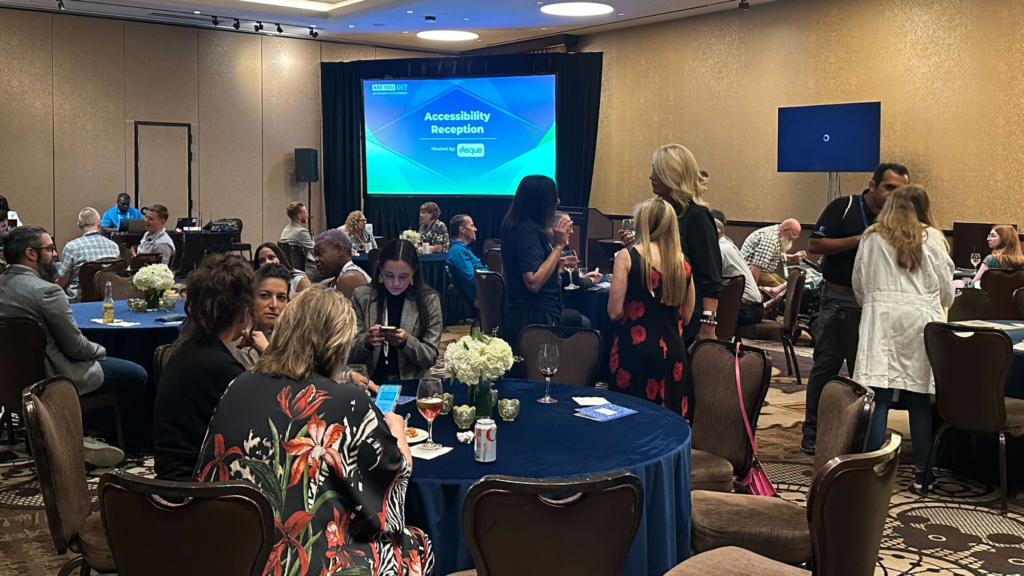
Wednesday’s main event for all at Deque was the Accessibility Reception. As the event’s sponsor, we hosted our Accessibility Awareness Lab, which featured several stations around the room, each with interactive activities designed to show attendees various assistive technologies and demonstrate what these technologies make possible.

One of the most engaging components of the lab was the Accessibility Stories Table, where Patrick Sturdivant, Vice President and Principal Strategy Consultant at Deque and an experienced software engineer who is blind, connected with guests and answered questions about his lived experience.

Dozens of attendees network together and explore the various lab stations. Seen in the foreground here, attendees chat with Rachael at the mobile station and Patrick at the lived experiences station.
Patrick Sturdivant of Deque, connecting with a guest at the Accessibility Stories Table

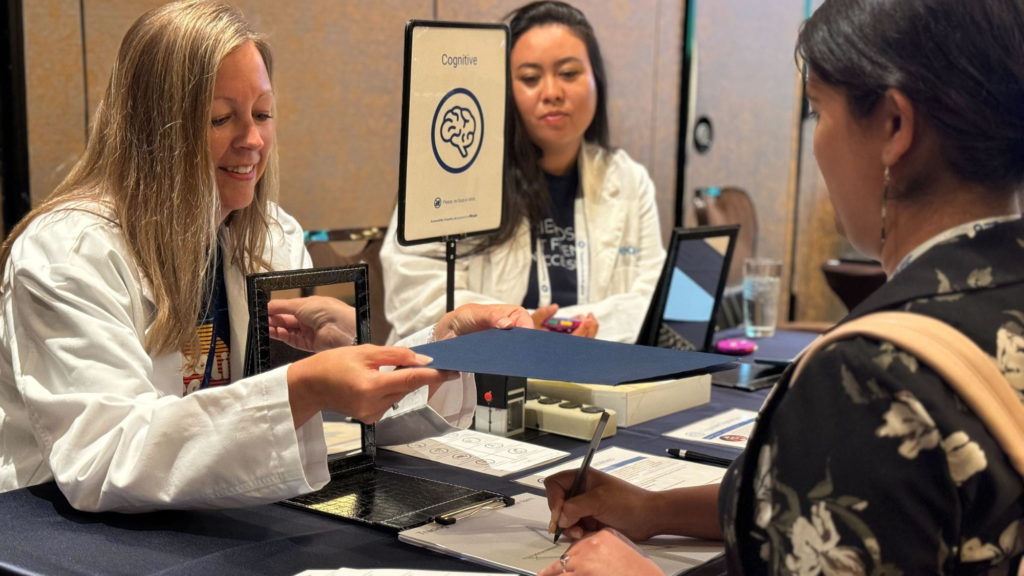
Attendees loved the Accessibility Stories Table, as well as the Cognitive Station, where participants were challenged to trace a star first by looking at it directly, and then by doing so backward in a mirror. This activity illustrated how simple activities can wear on your cognitive load if you are neurodiverse or have a traumatic brain injury.

Deque's Katie Olson, engaging with a guest at the Cognitive Station
Deque’s Katie Olson, engaging with a guest at the Cognitive Station

Laura Nandakumar, Deque’s Event Manager and Marketing Analyst, expressed that it was “wonderful to see accessibility leaders and enthusiasts get excited about learning about disability.” She went on to observe that “having awareness and building empathy are critical to advancing digital equality, and our team of onsite experts had a great time leading stations to ignite that spark.”

The Accessibility Reception, hosted by Deque
The Accessibility Reception at DisabilityIN 2024, hosted by Deque

The reception was a memorable and moving way to round out our DisabilityIN experience, and we’re deeply grateful to everyone who attended.

Conclusion

At DisabilityIN, we’ve been able to experience firsthand how accessibility champions are combining values-first missions with transformative technologies to make meaningful progress and drive real change. We’ve shared panels with visionary thought leaders, met and exchanged ideas with practitioners, advocates, and allies, and welcomed guests to our Accessibility Awareness Lab.

While the conference has come to its end, we know the work of disability awareness and digital accessibility is ongoing, and we want to acknowledge the power and passion of every single attendee. Together, we are a movement, and we are making the world a more inclusive place through the strength of our community.

Do you want to continue the conversation? Reach out today, and let’s make digital accessibility a reality for everyone, everywhere!

Deque Systems

Deque Systems

Deque is the global leader in digital accessibility, helping the world’s top enterprises build inclusive products, services, and experiences and achieve lasting compliance. Recognized by leading industry analysts for its AI-powered tools, comprehensive services, and developer-trusted solutions, Deque delivers the industry’s most complete accessibility offering. The Axe platform, anchored by Axe-core, has more than 3 billion downloads and 875,000 installed extensions, making it the global standard for accessibility testing. As a pioneer of people-first accessibility, Deque applies a human-in-the-loop approach that blends expert insight with AI innovation to advance its mission of digital equality for all.

A strong accessibility foundation is the most crucial component for building a successful accessibility practice at your organization, and everyone will need to be on board and engaged for the practice to take hold and succeed. There will inevitably be some thought-shifting that needs to take place and foundational principles that need to be understood and accepted. Over the years, I’ve advised all sizes and manners of organizations, and I’ve found that the following organizational principles need to be put in place.

In order to build the robust accessibility foundation needed to serve your end website users and adhere to compliance, your company must have:

  1. The inclination to practice accessibility
  2. The time to do the work
  3. Education and training to understand how to do the work
  4. Access to expert accessibility solutions to support ongoing work
  5. The automation and accessibility tools required to shift left and drive success

Before you can get started, each stakeholder needs to understand what these principles are, how they apply to their work specifically, and how to realize them across the company.

The inclination to practice digital accessibility

In this blog post, we’ll talk about the first principle and the three important actions that make a solid accessibility foundation possible across an organization:

  1. Obtaining executive buy-in
  2. Creating and enforcing an accessibility policy
  3. Running an accessibility awareness campaign

How to obtain executive buy-in

I’ve seen hundreds of companies practicing accessibility, and not a single one has made significant, sustainable progress without the backing of their C-suite. I cannot stress how important it is to make this happen. With that backing, accessibility will remain a priority through business ups and downs, leadership changes, acquisitions, mergers, and more. In other words, it will become a piece of the company’s fabric and culture.

Building the business case for digital accessibility

Your C-Suite will want to know the risks, opportunities, direct costs, and extended costs of the program before they approve. So, you’ll need to build the business case. Here are some of the actions you’ll need to take:

  • Analyze your current risks and determine how an accessibility program can mitigate them.
  • Detail the opportunities and business benefits. This means increased market share, improved brand reputation, reduced operational costs, legal and compliance risk mitigation, and more.
  • Determine your direct costs, the internal hours needed to transform your organization.
  • Frame out your extended cost: Who you will hire to help, the cost of accessibility tools, training, and education, and more.
  • Conduct modeling to project the return on investment and determine your horizon to build out a sustainable capability.

Business benefits of accessibility

Market share. Being accessible increases your market share. People with disabilities have a disposable income of $500 billion in the United States alone. In market terms, that’s 24% of US citizens. Expand this to the disability community—friends and family of persons with disabilities—and that number jumps to 73% of US citizens!

Brand reputation. Demonstrating a commitment to accessibility aligns your company’s brand with social justice movements. Today’s consumers consider a business’s core value when they are making their buying decisions. A widely cited Harris poll recently concluded that more than 80% of consumers want brand values to align with their own.

Cost efficiency. Making your digital properties accessible decreases operational costs. You may be a multi-channel company with brick-and-mortar stores, call centers, a mail facility, and more. But your least expensive channel is always the digital one. To save on operational costs, it’s important to enable all of your customer base to use that channel.

Risk avoidance. Being accessible decreases the risk of complaints, demand letters, and lawsuits, as well as the expenses that come with them. Not being accessible can result in very public, very negative disclosures that harm your brand. There can also be significant financial consequences.

Raising these important factors addresses the things your executives care about most and are accountable for on a daily basis and will help them make accessibility a priority.

How to create and enforce an accessibility policy

Once you have executive buy-in, you must create the policy that will drive your internal organization. An accessibility policy (not to be confused with an accessibility statement) clearly lays out your path to success.

A good policy will:

  • Identify all the stakeholders. Your stakeholders will include development, design, product owners, compliance, legal, procurement, budgeting, and more.
  • Set your targets or scope. Examples of this might be achieving WCAG 2.0 A/AA compliance by a certain date or having no critical or serious issues and creating a backlog of minor and moderate issues by a certain date.
  • Make the accessibility policy flexible. It’s important to increase scope and quality over time. Don’t immediately say, “This policy covers every piece of digital content out there,” because two things will happen if you do: 1) You’re going to fail, and 2) You’re going to immediately be in violation of your own policy.
  • Don’t let the policy outrun your capability. Build the capabilities and the teams and ensure they have a chance to be successful before you hold them to the policy standard.
  • Understand your audience and communicate professionally. You need to create a good first impression as you’re getting started, especially if accessibility is new at your organization. Good communication is also important as you work across departments.
  • Have timelines and goals around enterprise approval. To convince your C-suite or create a policy, you need to have an actual timeline goal so that you’re holding people to making decisions so you can move forward.
  • Take your roadshow to key stakeholders. Once they understand what you’re trying to accomplish, they’ll try to help you.
  • Make accessibility easy and funded. Success happens when processes are efficient and effective, and the work is funded and resourced appropriately.

By following these principles, your policy will be written in a way that’s manageable now, and sustainable and extendable into the future as you drive toward your long-term objectives.

A key aspect of your accessibility foundation is accessibility governance

It’s also important to adopt a governance structure and a tool such as a tracking system. If you’re a large organization, there’s a 99% chance that you already have a tracking system that your company is using for enterprise risk management. If that’s the case, use that system. Also, you can reuse the policy structure from this system, so you don’t have to create everything from scratch.

Stakeholders also need to have periodic accountability discussions. For example, between development executives, senior business leaders, and the C-suite.

How to run an accessibility awareness campaign

Most of your employees are probably unfamiliar with how people with disabilities navigate websites and applications. An accessibility awareness program is a great way for people to fully understand what this looks like.

First, discuss what types of disabilities exist and how people might interact differently with your content. Next, give employees hands-on experiences with the assistive technologies people with disabilities use. This is always a “lightbulb” moment. Once people understand what types of disabilities exist and how people with disabilities navigate the web, discuss how everyone can start changing the way they do their own work and how to make your website and applications accessible to these assistive technologies.

This may seem like a very simple project—it isn’t. Accessibility education needs to be an ongoing and regular part of training for everyone in your organization.

Accessibility awareness activities

  • Accessibility awareness labs. They can be either virtual or physical. Labs demonstrate how someone with a disability might use assistive technology to interact with the physical or digital world.
  • Accessibility holidays. Coordinate communications with an accessibility holiday. Global Accessibility Awareness Day and International Persons with Disabilities Day are two major accessibility events.
  • Ongoing and robust communications plan. Plan regular emails to promote learning for everyone and create a dedicated Slack channel. If you have one, partner with your organization’s disability employee resource group.

It’s very important for everyone at your company to understand how they can help with accessibility, but it’s especially important for designers and developers so they fully buy-in and don’t see it as a burden.

Risk management and accessibility: Keeping things on track

We’ve discussed how to talk about the business case for accessibility with your C-suite, how to create an accessibility policy, and how to teach people about the importance of accessibility.

In the beginning, you’re likely to encounter problems and pushback. Change is hard. One way to overcome this is by managing accessibility formally, with established project or change management processes.

Let’s do a very brief exercise on risk management to avoid or mitigate pushback.

A standard risk statement can be thought of like this: Due to X, there’s a risk that Y will happen, and if it does, the result will be Z.

For example, “Due to a lack of multi-year funding, there’s a risk that funding for subsequent years might not be adequate for the roadmap, and this would result in a failure to meet multi-year goals or a drop in quality.”

Other possible risks might include:

  • Failure to get executive backing
  • Failure to involve stakeholders
  • A policy that is too strict and too fast
  • A policy with no exception processes
  • A policy that doesn’t track exceptions
  • A policy that doesn’t assign accountability

To mitigate your risks, you’ll need to first prioritize risk management based on the probability of occurrence and the impact it will have. You simply can’t mitigate every risk that’s out there.

Then, do a risk session. Have stakeholders write down potential risks and classify them into topics, probabilities of occurrence, and probabilities of impact. You’ll be able to identify those things that you need to take action on first.

Here’s an example: Due to a failure to involve all stakeholders, teams are not allocating enough sprint time to complete the work, resulting in critical and serious defects going into production.

This is a risk that I see almost every single accessibility program deal with at some point or another. To mitigate a risk of this kind:

  • Identify groups controlling product scope.
  • Create a communications plan to revisit executive mandate and information.
  • Conduct sessions with product owners and managers to discuss needs.
  • Prioritize accessibility as a non-functional requirement.
  • Make it easy by providing tools and automation.
  • Measure outcomes, gamify, report, and reward.

Begin your organizational change journey now

Accessibility isn’t necessarily difficult, but it does take time to create organizational change. The most important thing is to get started now. Keep in mind that accessibility requires patience, persistence, and commitment.

The good news? Automated tools such as the axe DevTools browser extension can have a huge impact on your development team’s ability to get started immediately. So, go ahead and get a tool and find enthusiastic early adopters who really want to see change happen.

Let’s look at some numbers:

  • Up to 67% of defects can be identified and fixed in design. This is the most effective and cost-conscious method.
  • Every defect identified and fixed in development costs an average of $350 less than finding and fixing it during QA.
  • Every defect identified and fixed in QA costs an average of $450 less than fixing in production
  • Letting a defect get into production can cost up to $800 or more to fix.

When defects go into production, you have to worry about:

  • Customers unable to use content
  • Customer complaints and dissatisfaction
  • Increased litigation risk
  • Increased regulatory risk
  • Damaged brand reputation
  • and more!

If you scale these costs to thousands of pages and thousands of defects, you can see how critical it is to prevent defects as early in the development process as possible.

This is why it’s so important to invest in the resources your developers need to do the job right. Without proper education, training, coaching, and tools, conscientious developers will try, but they’ll struggle, and you’ll have poor results.  Supporting them properly from the start is critical to saving development time and money, and for the organization as a whole to practice accessibility sustainably.

Build your accessibility foundation with Deque Systems

Embracing the steps I’ve outlined above is how you can build the foundation for digital accessibility. But remember, this is only the first step, and the work is ongoing. This is why I like to say that accessibility is not a product, it’s a practice!

Don’t navigate trying to build an accessibility foundation alone — let Deque Systems’ seasoned experts guide you toward a more inclusive, compliant, and user-friendly digital experience with our industry-leading accessibility solutions.

Schedule your free discovery call today and gain the confidence to take your accessibility program to the next level.

Greg Williams

Greg Williams

Greg Williams is the Senior Vice President & Chief Architect at Deque Systems, Inc. He oversees program development and operations for some of Deque’s largest customers, helping them to build mature, sustainable accessibility programs.

Prior to joining Deque, Greg spent more than 30 years in the information technology field focusing on large, complex program operations for Fortune 40 companies and before that served in the United States Navy for a number of years. He had great success as the founder and owner of the Digital Accessibility Program Office for State Farm Insurance, building their practice from the ground up into one of the highest maturity level programs in the world between 2013 and 2018.

Greg has always been passionate about diversity and inclusion and has extended this passion to the disability and accessibility community - joining Deque Systems in 2018 to help launch and mature similarly successful programs across the globe.

There are two ways organizations typically approach digital accessibility. One approach is proactive. It’s efficient, cost-effective, and results in better and more accessible products. The other approach is reactive. It’s expensive, inefficient, and continues to expose users to accessibility barriers.

As you read that, you’re probably thinking, why would any business choose the reactive approach?

That’s a great question! The problem is that organizations don’t always realize they’re taking a reactive approach to digital accessibility.

Understanding how your organization can end up stuck in a reactive mode is the first step toward transformation.

How organizations get stuck in reactive break-fix cycles

Accessibility efforts at an organization often begin in response to an unexpected trigger or catalyst.

These catalyst events come in different forms. You might be selling your product to a business when they suddenly demand digital accessibility and a VPAT (Voluntary Product Accessibility Template) or Accessibility Conformance Report (ACR). Or, you might receive a demand letter from a law firm representing an individual demanding digital accessibility. New legislation might get passed that you’re not prepared for.

In all these kinds of cases, your response is, by definition, reactive.

A reactive response generally involves a decision to find and fix accessibility issues, which can quickly become overwhelming. Initial automated and guided testing will often reveal thousands (if not tens of thousands) of defects. These typically get passed to already busy development teams to fix without accounting for the extra time required to do the accessibility work.

This situation gets exacerbated because, even as some development teams are working to address a backlog of accessibility issues, other teams are carrying on with updating and creating new content, unaware of any accessibility requirements. You end up fixing broken things over here while creating new broken things over there. Before you know it, your organization is stuck, trapped in an endless break-fix cycle.

At this juncture, many organizations call in an accessibility partner. But too often, it’s for the wrong reasons. You don’t need another audit and another list of broken things to fix. You need guidance on escaping this reactive break-fix cycle and moving toward a proactive approach that focuses on accessibility from the start.

This approach is called “shifting left.

It involves conducting accessibility testing early in the design and development stages and catching accessibility issues sooner. When your organization shifts left, you save money, free up your teams, and create better and more accessible products.

How organizations can shift left and get proactive about digital accessibility

Shifting accessibility testing to earlier in the design process may initially sound fairly straightforward. But in actual practice, fully embracing a shift-left approach at a company-wide level involves more than just a change in process. The effort also involves time and resources, education and training, new tools and techniques, and more.

[shift-left-full]

The payoff is well worth it, and everyone will benefit, from accessibility leaders to your CFO to your product owners—not to mention your content development teams! But you’ll need to frontload the investment because it’s not realistic to expect your teams to consistently produce accessible content without setting them up for success.

Accordingly, the most important prerequisite for shifting left is that all relevant teams need to be fully enabled to practice shift-left accessibility.

We can think of this in terms of five “obligations of accessibility.” These are the things you need to provide in order to ensure it’s possible for your organization and your teams to produce accessible content in the most efficient manner.

5 obligations of accessibility

  1. The inclination to practice digital accessibility
    There are three important actions that are required to make this possible across an organization. You need to obtain executive buy-in, create and enforce an accessibility policy, and run an accessibility awareness campaign. C-suite backing ensures accessibility remains a priority, an accessibility policy lays out the path to success, and awareness campaigns help employees understand why accessibility matters and how they can help.
  1. Time to do the work
    Planning the time to add accessibility requirements into design, development, and testing is critical to success. In an organization with little accessibility testing automation, the overall cost can be as much as 15% of software development life cycle time.
  1. Education and training to understand how to do the work
    Success depends on everyone in the organization understanding more about accessibility, assistive technologies, and disability. Learning how to design with accessibility in mind and applying it within your tech stack is a large undertaking that requires education and training. People will need to learn new tools and skills, as well as new concepts and practices.
  1. Access to expert resources to support ongoing work
    As technology changes and evolves, so too does our ability to create new tools and techniques that support accessibility. Our understanding of disability continues to improve as well. And with every advancement, new laws are written, and new guidelines are developed. The work of accessibility continues as things change, and it’s essential to have expert guidance to stay on top of it all.
  1. The automation and tools required to shift left and drive success
    Reaching an efficient and sustainable practice of accessibility requires automating as much as possible at every juncture of content development. Procurement, implementation, and roll-out of these tools is a must-have to enable a shift-left approach.

The tools to shift left

Number five is a uniquely critical component, and I’d like to take an additional moment to briefly discuss the role automation and tools play in the shift left approach.

Your developers are the beating heart of digital accessibility work, and it’s critical they have the tools they need. And those tools need to deliver the right results, because winning over your development teams is essential when it comes to transformative long-term change. Acceptable tools must be fast, accurate, easy to use, and integrated into developers standard workflows.

For example, tools that return false positives will derail your plans. Nothing subverts credibility more than having to chase issues that are not actually issues, and high rates of false positives pretty much guarantee your teams will stay trapped in that break-fix cycle.

It’s also important that tools are appropriately tailored to your team’s levels of expertise. You can provide automation tools to novice developers and get 80% issue coverage right out of the gate while simultaneously enabling more experienced teams with advanced insights as they’re conducting manual testing.

Prioritization is yet another key piece of the puzzle. Developers need to know they’re focusing on the most critical issues and not wasting time on low-priority issues, or, worse, duplicates.

Transforming from break-fix to shift left

Freeing up staff to address accessibility issues can be a challenge. Fortunately, products such as Deque’s axe Developer Hub make it easy to add accessibility testing to end-to-end tests. Your developers can find new issues and get feedback while coding in the IDE and within pull requests. And with a toolkit like axe DevTools, your organization can quickly get to 80% accessibility issue coverage.

Solutions like these that fit your team’s current workflow are the key to successfully implementing a shift left approach.

Conclusion

Exiting the reactive break-fix cycle and moving to a proactive shift left approach is about getting started and building momentum. This can happen one team, one department, even one issue at a time. Every single removal of an accessibility barrier will have a positive downstream impact. And by taking an iterative approach and proving early results, accessibility leaders can energize and motivate other teams to begin prioritizing accessibility.

As your successes increase and your efforts expand, you’ll need to continue making resourcing and funding decisions, and there will be ongoing work for your centralized accessibility team. Fortunately, we have seen that early success creates a “positive pull motion,” where entire development organizations realize that fixing issues early makes their lives easier and delivers improved quality for all.

The results are transformational, with everything becoming easier, more efficient, and streamlined over time. Your organization will lower costs and see increasing ROI on the investment. Your product owners will reclaim the full ability to evolve their products.

Digital accessibility is a win for everyone, and achieving it at scale means getting proactive, shifting left, and breaking the break-fix cycle.

Get started today!

Greg Williams

Greg Williams

Greg Williams is the Senior Vice President & Chief Architect at Deque Systems, Inc. He oversees program development and operations for some of Deque’s largest customers, helping them to build mature, sustainable accessibility programs.

Prior to joining Deque, Greg spent more than 30 years in the information technology field focusing on large, complex program operations for Fortune 40 companies and before that served in the United States Navy for a number of years. He had great success as the founder and owner of the Digital Accessibility Program Office for State Farm Insurance, building their practice from the ground up into one of the highest maturity level programs in the world between 2013 and 2018.

Greg has always been passionate about diversity and inclusion and has extended this passion to the disability and accessibility community - joining Deque Systems in 2018 to help launch and mature similarly successful programs across the globe.

The Americans with Disabilities Act (ADA) Title II now requires all state and local governments, along with their third-party contractors and software vendors, to comply with WCAG 2.1 A/AA standards.

This new rule, published in the Federal Register by the US Department of Justice (DOJ) on April 24, 2024, mandates that software and IT services be accessible to people with disabilities. Depending on the size of the population served, organizations have two or three years to comply.

That’s not much time.

Particularly when vital public services provided by state and local governments are almost always underfunded. Fortunately, the emergence of third-party vendors that can offer digital services to these public entities has been a blessing in that application and IT solution providers working for these organizations have the ability to move and respond quickly to changing needs.

The positive synergy of this relationship between state and local governments and their third-party vendors will be tested, however, by the timeline for these new ADA Title II requirements. The urgency is real.

In this article, we’ll provide you with the information you need to begin building your roadmap to compliance today.

Brief overview of the new ADA Title II requirements

The new ADA Title II regulations mandate that all US state and local government websites and mobile applications meet the Web Content Accessibility Guidelines (WCAG) 2.1 at Level A and AA. These guidelines, developed by the World Wide Web Consortium (W3C), set the international standard for making digital content accessible to people with disabilities.

This law ensures that public services provided through digital platforms are usable by everyone, including individuals with visual, auditory, motor, speech, and cognitive disabilities. Compliance with these standards is crucial for providing equitable access to essential services such as paying taxes, accessing public records, and participating in community events. Organizations must achieve full compliance within two to three years, emphasizing the need for immediate action.

Who must comply with the new ADA Title II requirements

State and local Governments in the US

The new requirements apply to all state and local government entities across the United States. By definition, “State” means each of the 50 US states, as well as the District of Columbia, the Commonwealth of Puerto Rico, Guam, American Samoa, the Virgin Islands, the Trust Territory of the Pacific Islands, and the Commonwealth of the Northern Mariana Islands. Local government applies to county, city, town, and municipal governments.

The DOJ specifies that this also includes a wide range of public bodies such as municipal offices, county administrations, state agencies, public schools, libraries, and museums. These entities must ensure that their websites, mobile applications, and other digital services are accessible to people with disabilities.

Third-party contractors and software vendors

In addition to state and local governments, the new regulations extend to third-party contractors and software vendors providing digital services to these public entities. Any company that develops, manages, or supports digital platforms used by state and local governments must comply with WCAG 2.1 A/AA standards within the same timelines.

These third-party vendors play a critical role in ensuring that the digital services offered by government entities are accessible. They, too, must prioritize accessibility in their design, development, and maintenance processes to meet the new ADA Title II requirements.

Specific implications for third-party vendors

According to the DOJ Fact Sheet, any company supplying digital solutions used by state and local governments must ensure their products are accessible and compliant with WCAG 2.1 A/AA standards. Some examples include:

  • Parking payment apps
    • Companies that develop and maintain parking payment applications, which municipalities rely on for managing parking fees and fines, must ensure these apps are accessible. This includes ensuring that all features, from payment processing to receipt generation, are usable by individuals with disabilities.
  • Website template providers
    • Vendors that provide customizable website templates and content management systems (CMS) for towns and cities are required to make their platforms fully accessible. This ensures that all public-facing web pages created using these templates meet accessibility standards.
  • Payment processors
    • Companies that process online payments for municipal services, including utilities, taxes, and permits, must ensure their systems are accessible. This includes making sure that payment forms, navigation, and transaction confirmations are usable by individuals with disabilities.
  • Event ticketing services
    • Third-party vendors offering online ticketing solutions for public events, such as concerts, theater performances, and sporting events, must ensure that their platforms are accessible. This includes ticket selection, purchasing, and electronic ticket delivery.
  • Educational technology providers
    • Companies providing learning management systems (LMS), online course platforms, and other educational technologies to public schools and universities must ensure their services are accessible to all students, including those with disabilities.
  • Health service platforms
    • Vendors supplying digital health services to public health departments, including appointment scheduling systems, patient portals, and telehealth platforms, must ensure accessibility to comply with the new regulations.
  • Public service applications
    • Applications used for accessing various public services, such as permit applications, license renewals, and public record requests, must be compliant. Vendors providing these solutions need to ensure that every step of the user interaction is accessible.

The urgency of compliance for third-party vendors

Third-party vendors potentially only have two years to conform to the new standards. Accordingly, launching compliance efforts immediately is critical. Failure to comply in time can result in legal repercussions and a loss of business from state and local governments that now require WCAG-compliant solutions.

Time is particularly of the essence because it often takes companies many months—and in some cases several years—to build a sustainable accessibility program and remediate existing technical debt.

As a third-party vendor providing digital services to state and local governments, you should do the following to ensure you can meet the new Title II requirements before the deadline:

  • Conduct comprehensive accessibility audits: Assess current products and services to find and fix accessibility issues.
  • Train all relevant teams: Ensure your teams are able to remediate and “shift left,” enabling accessibility throughout the entire life cycle so that operational costs are as effective as possible.
  • Embed accessibility in design and development: Make WCAG 2.1 A/AA a requirement in your design and development process for the most cost-efficient and sustainable solution. As a best practice, work with people with disabilities to ensure you design experiences with and for them.
  • Partner with accessibility experts: Collaborate with accessibility professionals who can provide guidance, training, and support as you build your WCAG muscles.
  • Monitor and maintain accessibility: Continuously monitor digital services for accessibility and make necessary updates to stay compliant with evolving standards.

By taking these proactive steps, you’ll ensure compliance with ADA Title II and enhance the usability and inclusivity of your digital services, ultimately benefiting a broader audience—and your business. There is significant ROI in WCAG compliance that goes well beyond mitigating legal risk. By responding quickly to the urgency and getting ahead of the new requirements, you position your organization as a leader in the field.

An overview of required accessible services

The new law covers a wide array of digital services. While not exhaustive, this list provides a solid overview of online services that must meet the new accessibility standards.

  • Online or mobile payments
    • Citations and fines: Paying traffic tickets, parking fines, or other municipal penalties.
    • Taxes: Submitting local property taxes, income taxes, or business taxes.
    • Utilities: Paying for water, electricity, gas, and other utility services.
    • Licenses and permits: Paying for business licenses, building permits, and other regulatory fees.
    • Parking: Paying for metered parking or purchasing parking permits.
  • Online purchasing of tickets
    • Lottery tickets: View winning numbers, updates on jackpot amounts, check tickets for winning status, and more.
    • Sporting events: Buying tickets for local sporting events, school games, or community sports leagues.
    • Cultural events: Purchasing tickets for concerts, theater performances, and other cultural events hosted by public entities.
    • Public transportation: Buying tickets or passes for buses, trains, and other public transit systems.
  • Access to public records
    • Document requests: Requesting copies of public records such as birth certificates, marriage licenses, and property deeds.
    • Meeting agendas and minutes: Accessing information about city council meetings, school board meetings, and other public gatherings.
  • Educational services
    • School portals: Accessing student information systems for grades, attendance, and school announcements.
    • Online learning platforms: Participating in virtual classes, accessing educational materials, and submitting assignments.
    • Library services: Accessing digital catalogs, borrowing e-books, and using other online library resources.
    • Museum services: Accessing online exhibits, ticket purchasing, event registration, and educational resources.
  • Public health and safety information
    • Emergency alerts: Receiving notifications about weather emergencies, public safety threats, and other urgent information.
    • Health services: Scheduling appointments, accessing medical records, and finding information about local health services.
  • Community engagement and participation
    • Surveys and feedback: Participating in community surveys, providing feedback on public projects, and submitting complaints or suggestions.
    • Volunteer opportunities: Signing up for community service and volunteer programs.
  • Employment services
    • Job applications: Applying for jobs with state or local governments.
    • Training programs available to the public: Accessing job training and professional development resources.
  • Recreational services
    • Facility reservations: Booking community centers, sports facilities, and public parks for events or activities.
    • Program registration: Signing up for recreational programs, classes, and workshops.
  • Legal and judicial services
    • Court services: Accessing court records, paying court fees, and scheduling court appointments.
    • Legal aid: Finding information about legal aid services and resources for low-income residents.

Getting ADA compliant using Deque

Deque offers a comprehensive suite of tools and services designed to help organizations achieve ADA compliance and create accessible digital experiences. Our solutions are tailored to meet the needs of both state and local governments and their third-party vendors, ensuring that all digital services are inclusive and meet the new ADA Title II requirements.

Accessibility audits

Deque’s thorough accessibility audits provide a detailed assessment of your digital assets to identify and remediate accessibility issues. These audits cover websites, mobile applications, and other digital platforms, offering a clear roadmap to compliance with WCAG 2.1 A/AA standards. Our expert auditors use advanced tools and methodologies to pinpoint barriers and provide actionable recommendations for improvement.

Consulting services

Deque’s team of experienced accessibility professionals works closely with your organization to develop and implement effective accessibility strategies specific to your unique needs and circumstances. We provide hands-on assistance, from initial assessments to ongoing support, ensuring your digital services remain compliant and accessible. Our team of Strategy Consultants has a collective 58 years of experience, helping run and improve some of the world’s largest digital accessibility programs.

Educational initiatives

Deque offers a range of educational initiatives to keep your team informed and compliant with the latest accessibility standards and best practices. Our webinars, workshops, and training sessions are designed to build your team’s knowledge and skills in digital accessibility. These initiatives cover a wide array of topics, including WCAG compliance, accessible design and development, and the latest trends in digital accessibility.

Why choose Deque?

  • Industry leadership. Deque has been recognized by the Forrester Wave™ as “the best fit for organizations committed to embedding accessibility and wanting a vendor with strong services and great tools.”
  • Proven track record: Deque has a long history of helping government entities achieve and maintain compliance with accessibility standards. Our solutions are trusted by numerous public sector organizations to deliver accessible digital services.
  • Comprehensive tools: Our suite of tools (including axe DevTools and axe Auditor) supports designers, developers, and testers in creating and maintaining accessible digital content. These tools are widely recognized for their effectiveness and ease of use.
  • Expertise and innovation: Deque is at the forefront of accessibility innovation, continually enhancing our tools and services to meet evolving standards. Our commitment to the accessibility community and our contributions to open-source projects underscore our dedication to driving positive change.
  • Customized support: Our services are customized to address your specific challenges and goals, ensuring that you receive the support you need at every step of your accessibility journey.

By partnering with Deque, state and local governments and their third-party vendors can confidently navigate the new ADA Title II requirements and create more inclusive digital experiences for all users.

There’s no better moment than now to get on the path to compliance!

To learn more about how Deque can help your organization achieve ADA compliance, contact us for a free initial consultation to assess your current compliance status.

Glenda Sims

Glenda Sims

Glenda Sims is the Chief Information Accessibility Officer at Deque, where she shares her expertise and passion for the open web with government organizations, educational institutions, and companies ranging in size from small businesses to large enterprise organizations. Glenda is an advisor and co-founder of AIR-University (Accessibility Internet Rally) and AccessU. She serves as an accessibility consultant, judge, and trainer for Knowbility, an organization whose mission is to support the independence of people with disabilities by promoting the availability of barrier-free IT. In 2010 Glenda co-authored the book InterACT with Web Standards: A holistic approach to Web Design.

Welcome to the second in a series of blog posts about the EAA dedicated to breaking down the regulatory requirements, dispelling the complexities, and promoting the positive impact of adherence. Whether you’re a business owner wanting to ensure compliance, an advocate for digital inclusivity, or someone interested in European regulations, this series will offer comprehensive insights for everyone. In each post, we will unravel a new facet of the EAA, empowering you with actionable information to effectuate positive changes in alignment with the EAA.

You can find our first post in the series here: An introduction to the European Accessibility Act (EAA)

What is the European Accessibility Act (EAA)?

The European Accessibility Act (EAA), which goes into effect on June 28, 2025, is a European Union directive that aims to make products and services in the EU more accessible for people with disabilities and other persons who experience functional limitations, such as “elderly persons, pregnant women or persons traveling with luggage.”

The EAA sets out common accessibility requirements that certain products and services must meet. These requirements cover a wide range of products and services, including media content, digital software and content, financial services, and public services. If your business provides a digital product or service to consumers within the EU, the EAA likely applies to you!

Due to the comprehensive requirements cited by the EU Member States that have so far implemented the directive, many businesses may discover a gap between the current accessibility of their product or service and compliance and the directive, with little time to remediate.

In this post, we’ll focus specifically on implications for products. Our next post will tackle services.

Products

This legislative directive applies to a diverse range of industry sectors and touches upon numerous products, distilling multiple layers of complexity. Here, we’ll delve a bit deeper into the specifics—from general-purpose computer hardware and operating systems to various self-service terminals such as payment, ticketing, and check-in machines, and consumer terminal equipment used for electronic communications and audiovisual media services, all the way to e-readers. Regardless of your industry or business model, if you deal with these categories, the EAA can have significant implications. Let’s break it down.

Computer hardware systems and operating systems

In essence, the EAA mandates that both the hardware and software of standard consumer computer equipment need to meet specified accessibility standards. Here’s a closer look at how the Act applies to standard consumer computer equipment and their operating systems.

Consumer general-purpose computer hardware systems

Devices such as smartphones, tablets, laptops, and desktop PCs are explicitly included within the scope of the EAA. The directive emphasizes that these devices, due to their multipurpose nature and common use by consumers, should be designed with accessibility in mind.

Operating systems

The operating systems for these devices, including Android, Windows, macOS, and iOS are also directly addressed by the EAA. The directive recognizes that for these computer hardware systems to function accessibly, the underlying operating systems must also be designed to be accessible.

Televisions and media players

Televisions are defined as products within the scope of the EAA-Directive (EU) 2019/882, particularly connected or smart televisions, consumer terminal equipment with interactive computing capability, connected televisions, ICT with video capabilities, and more.

Set-top boxes and media players

The EAA Directive explicitly mentions “set-top box-based applications” and “connected television services” as falling under the umbrella of “services providing access to audiovisual media services.” This means that devices like Google Chromecast or Apple TV, which act as gateways to these services, are subject to the accessibility requirements outlined in the EAA.

A focus on services

A key takeaway from the EAA is its emphasis on services rather than individual components. The directive frequently highlights the need for the accessibility of the services provided through a device, not just the device itself. For example, “access to audiovisual media services” encompasses not only the hardware and software of the media player but also the accessibility of the content being accessed.

The EAA carefully outlines other services as well, such as subtitles for the deaf and hard of hearing, audio description, spoken subtitles, sign language interpretation, electronic program guides (EPGs), and connected television services.

Finally, as you think about everything TV-related, don’t forget packaging, CE marks, remote controls, and support and warranty user flows. The directive covers these additional items in other areas of the directive.

Self-service terminals

The EAA lays out a comprehensive framework for making self-service terminals more accessible within the EU. The directive not only sets clear requirements for the products themselves but also acknowledges the operational challenges faced by service providers by providing flexibility and encouraging a balanced approach to achieving inclusivity.

Devices like payment terminals—or any device whose primary function is to enable payments using payment instruments (like debit/credit cards) at physical points of sale—are included in the scope. This applies to both the hardware and software of these terminals.

The EAA specifically lists several self-service terminals that fall under its scope when they are dedicated to providing services covered by the directive. These include:

  • ATMs (Self-service banking outlets)
  • Ticketing machines: This category encompasses a range of machines that issue physical tickets granting access to services.
  • Check-in machines
  • Interactive information-providing terminals: This category includes terminals with interactive screens intended for providing information to the user. However, it’s important to note that this excludes terminals installed as integrated parts of transportation vehicles.

E-books, e-readers, and reader software

The EAA aims to create a level playing field, allowing people with disabilities to enjoy the same digital reading experience as anyone else. The directive specifically lays out some key requirements for e-books, e-readers, and reader software to ensure digital reading material is available to everyone.

The e-book file

At the heart of the issue is the e-book file itself. The EAA stresses the importance of these files being digitally built to work with “assistive technologies.” This means things like text-to-speech software, screen readers, and similar tools should be able to easily interact with the e-book. This accessibility is crucial for people with disabilities who may rely on such technologies.

E-reader devices

The EAA makes a clear distinction between general-purpose reader software and e-readers, which are dedicated devices designed specifically for consuming e-books. These devices, including their hardware and software, are subject to specific accessibility requirements under the EAA. This means manufacturers need to consider features like display customization, text-to-speech functionality, and overall usability for people with disabilities.

E-reader software

Reader software, be it an app on your phone, a program on your computer, or even a website offering a preview of a book, falls under the scope of the EAA. These platforms need to be designed with accessibility in mind.

Conclusion

The European Accessibility Act (EAA) marks a significant step toward a more inclusive digital landscape for individuals with disabilities and others who experience functional limitations. By establishing clear accessibility standards for a wide range of products and services, the EAA promotes equal access and participation in the digital world.

While the implementation of the EAA presents challenges, the potential benefits are substantial. As businesses work toward compliance, they contribute to a future where technology is accessible to all, fostering innovation and economic growth. This shift toward inclusivity is not merely a legal obligation but a societal imperative, reflecting a commitment to creating a world where everyone can thrive.

Policymakers, managers, content creators, developers, designers, testers, and anyone eager to learn about EAA compliance are encouraged to attend Countdown to enforcement 2025: Navigating the European Accessibility Act, a live webinar that will address everything from timelines and penalties to building a compliance blueprint. This special event will be held on June 25, 16:00 – 17:00 (CEST).

Stay tuned for our next post in the series, which will address EAA impact on how services are provided!

~

The official language of the directive can be found here: European Accessibility Act (EAA)

Sections cited throughout this post include:

Derrin Evers

Derrin Evers

Derrin Evers is a Senior Solution Consultant at Deque Europe. Derrin’s background and experience spans from design to development, small agencies to large enterprises, and public sector to private business from North America to Europe. With the professional goal to promote positive change within software development through digital accessibility, Derrin helps Deque customers discover, plan, and realize their potential through strategic and technical support across the software development lifecycle.